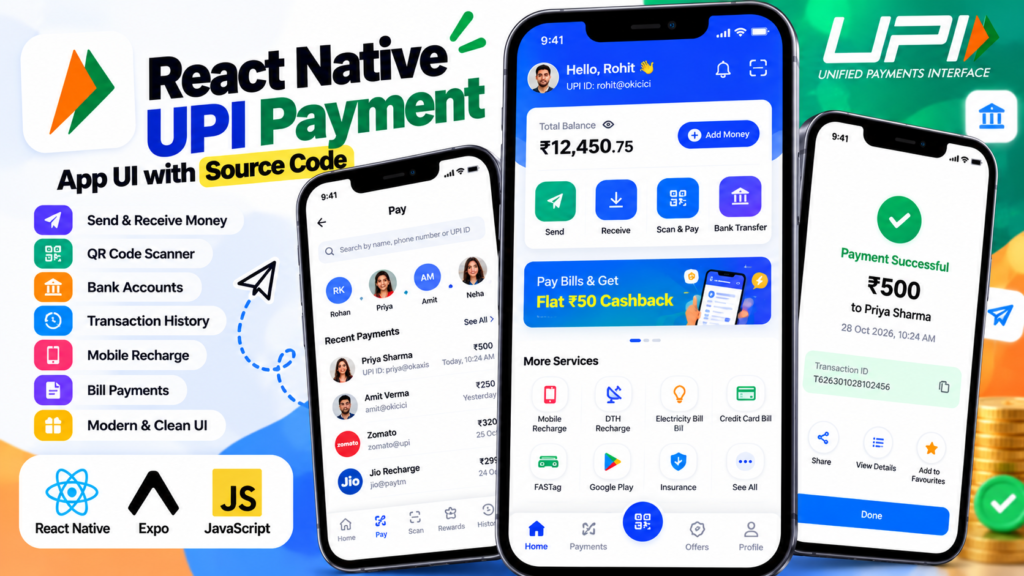
Build a modern React Native UPI Payment App UI with a clean fintech-style mobile interface for UPI payments, money transfers, mobile recharge, bill payments, financial services, cashback offers and other everyday services.
This React Native UPI Payment App project is designed as a frontend UI and learning resource for developers who want to create a digital payment, wallet, fintech or utility application using React Native. You can customize the interface, branding, navigation, services and components and connect it to your own backend APIs and payment infrastructure.
Important: This is a frontend UI project. It does not process real UPI transactions or provide a live UPI payment gateway.
Disclaimer: This is an independent UI project inspired by modern digital payment applications. It is not an official Paytm application and is not affiliated with, sponsored by, or endorsed by Paytm.
What Is This React Native UPI Payment App?
The React Native UPI Payment App UI is a mobile payment application interface designed with a modern fintech-style layout.
The project demonstrates how a React Native application can organize frequently used financial and utility services into a single mobile home screen. The interface can be adapted for a UPI app, digital wallet, fintech application, recharge platform, bill payment application or other mobile financial-service products.
The project includes UI sections for:
- UPI money transfers
- Scan and Pay
- Mobile and bank transfers
- Mobile recharge
- Bill payments
- Loans and credit services
- Cashback and promotional offers
- Travel and entertainment services
- User profile and account sections
- Mobile navigation
The frontend can be customized and connected to your own APIs, authentication system, database and backend services.
React Native UPI Payment App Features
This React Native Payment App UI demonstrates several common sections found in modern digital payment and fintech applications.
UPI Money Transfer UI
The payment interface provides quick-access sections for common UPI payment actions, including:
- Scan & Pay
- Transfer to Mobile
- Transfer to Bank
- Transfer to Self
- UPI payment actions
- Quick transfer options
These components provide a practical example of how frequently used payment actions can be presented prominently on a mobile application home screen.
The UI itself does not execute real UPI transactions. A production application requires a suitable payment infrastructure, backend APIs, transaction verification and security controls.
Mobile Recharge and Bill Payment UI
The application also includes sections for everyday recharge and utility services.
Example services include:
- Mobile Recharge
- Electricity Bill Payment
- DTH Recharge
- Rent Payment
- Utility Payments
- Other bill payment services
Developers can replace the sample content with dynamic data from their own APIs and backend services.
Loans and Financial Services
A fintech application can provide additional financial services without making the main interface difficult to navigate.
The project includes UI sections that can be adapted for:
- Personal Loans
- Credit Cards
- Pay Later
- Credit Score
- Financial Products
- Other financial services
These are interface examples only and do not represent actual financial products or financial-service integrations.
Cashback and Promotional Offers
Promotional sections can be used to display marketing campaigns and user offers inside a payment application.
You can customize these sections for:
- Cashback offers
- Discount campaigns
- Referral rewards
- Promotional banners
- Special offers
- User-specific promotions
Dynamic promotional information can be loaded from your backend API.
Travel and Entertainment Services
The multi-service interface can also be extended beyond payments.
Example categories include:
- Flight Tickets
- Bus Tickets
- Movie Tickets
- Event Tickets
- Travel Services
- Entertainment Services
For example, developers can connect the interface with their own travel or ticket-booking APIs.
Why Build a UPI Payment App with React Native?
React Native provides a component-based approach for building mobile applications with reusable UI components and shared development patterns across supported platforms.
For a React Native fintech app, reusable components can make it easier to maintain payment cards, service buttons, navigation, banners and other interface elements.
Examples of reusable components include:
- Payment cards
- Transfer buttons
- Service cards
- Transaction cards
- Promotional banners
- Recharge sections
- Profile components
- Financial-service cards
- Bottom navigation
- Payment action menus
A production payment application, however, requires much more than a frontend.
Authentication, secure APIs, backend services, transaction processing, payment infrastructure, data protection, error handling and applicable compliance requirements must be implemented separately.
What You Can Build with This React Native Payment App UI
This project can be used as a starting point for several types of applications, including:
- React Native UPI payment apps
- Digital wallet applications
- Fintech applications
- Mobile payment applications
- Recharge applications
- Bill payment applications
- Banking application interfaces
- Financial-service applications
- Utility payment applications
- Payment dashboard interfaces
You can change the branding, colors, icons, service categories, navigation and screen layouts to match your own application requirements.
React Native UPI Payment App Source Code
If you are looking for React Native UPI Payment App source code, this project provides a ready-made frontend UI that you can study, customize and extend.
Instead of creating the complete payment application interface from scratch, developers can use the existing UI structure as a starting point.
You can customize:
- App branding
- Colors
- Typography
- Icons
- Images
- Payment sections
- Service categories
- Navigation
- Promotional banners
- Profile sections
- Cards
- Home screen layout
After customizing the frontend, you can connect it to your own backend APIs and services.
React Native Payment App Backend Integration
The UI can be connected to a backend application built with technologies such as:
- PHP
- Laravel
- Symfony
- Node.js
- MySQL
- REST APIs
- Other backend frameworks
A typical architecture can separate the mobile frontend from backend services.
For example:
React Native App → REST API → Backend → Database / Payment Services
The frontend can handle the mobile interface while the backend manages authentication, users, transactions, application data and communication with external services.
React Native UPI Payment App Architecture
A simplified component structure for the application could look like this:
HomeScreen
├── Header
├── UserProfile
├── UPITransferSection
│   ├── ScanAndPay
│   ├── MobileTransfer
│   ├── BankTransfer
│   └── SelfTransfer
├── RechargeSection
├── BillPaymentSection
├── FinancialServices
├── CashbackBanner
├── TravelServices
└── BottomNavigation
This component-based structure makes it easier to maintain individual sections and reuse components across different screens.
A larger application can extend the structure with:
- Transaction History
- Payment Confirmation
- Notifications
- User Profile
- Settings
- Help and Support
- Offers
- Wallet
- Payment Methods
Is This a Real UPI Payment Integration?
No.
This project is primarily a React Native UPI Payment App UI and frontend project.
It demonstrates the interface and structure of a payment application but does not automatically process real UPI transactions.
To build a production UPI payment application, developers need to implement appropriate:
- Backend APIs
- Authentication
- Payment infrastructure
- UPI or payment-provider integration
- Transaction verification
- Database systems
- Security controls
- Error handling
- Compliance requirements
The project should therefore be treated as a frontend starting point, not as a complete production payment solution.
What You Can Learn from This React Native Project
This project can be useful for developers learning React Native and mobile UI development.
By studying the project, you can learn how to:
- Build a modern React Native mobile interface
- Create reusable React Native components
- Structure a fintech-style application
- Design payment-related interfaces
- Build card-based mobile layouts
- Create bottom navigation
- Organize multiple services on one screen
- Create responsive mobile layouts
- Customize a React Native application
- Prepare a frontend for backend API integration
- Design a modern payment application home screen
It can also be useful for students and developers searching for React Native project ideas, mobile app source code and practical frontend projects.
React Native UPI Payment App for Beginners
Building a complete payment application can be complicated because production payment systems require secure authentication, backend services, APIs, transaction processing and payment infrastructure.
For beginners, starting with the user interface is a practical way to understand how a real-world payment application can be structured.
After completing the UI, developers can gradually add:
- User authentication
- Backend APIs
- Database integration
- User profiles
- Transaction history
- Payment services
- UPI integration
- Notifications
- Secure transaction processing
This makes the project useful as a learning foundation before attempting a complete production-grade fintech application.
How to Customize the React Native UPI Payment App UI
One of the main benefits of using a ready-made React Native project is that developers can modify the interface according to their application requirements.
You can change:
- Logo and branding
- Primary and secondary colors
- Typography
- Icons
- Images
- Payment options
- Service categories
- Navigation
- Promotional banners
- Profile components
- Card designs
- Home screen sections
You can also replace static sample data with dynamic information from your own APIs.
For example, a service card can be connected to an API that retrieves available services, while transaction components can display data retrieved from your backend.
Who Should Use This React Native UPI Project?
This project can be useful for:
- React Native developers
- JavaScript developers
- Mobile app developers
- Frontend developers
- UI/UX designers
- Students learning React Native
- Beginners looking for React Native projects
- Developers building fintech applications
- Developers looking for payment app UI
- Developers looking for React Native source code
It can be used for learning, experimentation, portfolio projects and as a frontend foundation for a larger mobile application.
React Native UPI Payment App Source Code Download
If you are searching for UPI Payment App source code or a React Native Payment App UI, this project provides a ready-made frontend interface that can help you start faster.
You can study the project structure, customize the UI and connect the application to your own backend.
The project can be extended with your own:
- Authentication
- APIs
- Database
- Payment services
- Transaction history
- User profiles
- Notifications
- Backend functionality
Download the React Native UPI Payment App UI source code from SkillHost and use it as a starting point for your own React Native fintech project.
Frequently Asked Questions
What is a React Native UPI Payment App?
A React Native UPI Payment App is a mobile application interface designed around UPI and digital payment services. It can include payment actions, transfers, recharge, bill payments and other financial services.
This SkillHost project focuses primarily on the frontend UI rather than processing real financial transactions.
What is a React Native UPI App UI?
A React Native UPI App UI is the frontend interface of a mobile application designed for UPI and digital payment services.
It can include components for:
- UPI transfers
- Scan and Pay
- Recharge
- Bill payments
- Financial services
- Offers
- User accounts
Is this a real UPI payment application?
No. It is primarily a frontend UI project. Real UPI transactions require appropriate payment infrastructure, backend services, transaction processing, security mechanisms and other production requirements.
Is this an official Paytm application?
No. This is an independent React Native UI project inspired by modern digital payment applications. It is not an official Paytm application and is not affiliated with Paytm.
Can I customize this React Native Payment App UI?
Yes. You can customize the branding, colors, icons, services, navigation, banners, cards, components and overall layout.
Can I connect this React Native UPI UI to my backend?
Yes. The frontend can be connected to your own backend APIs to implement authentication, user profiles, application data, transactions and other functionality.
Can I use PHP or Laravel as the backend?
Yes. The React Native frontend can communicate with a backend built using PHP, Laravel, Symfony, Node.js or another suitable backend framework through APIs.
Can I use this project to build a fintech application?
Yes, as a frontend starting point. Production fintech functionality must be implemented separately, including secure authentication, backend services, payment infrastructure, transaction verification and applicable security and compliance requirements.
Is this React Native project suitable for beginners?
Yes. It can be used as a practical learning project for understanding React Native components, layouts, navigation and fintech-style mobile UI design.
What can I learn from this React Native project?
You can learn how to structure a mobile payment interface, create reusable React Native components, design service cards, organize multiple services and prepare a frontend for backend API integration.
Can I use this project for a portfolio?
Yes. You can use the project as a learning or portfolio project and demonstrate your React Native UI development skills. If you modify or extend the project, clearly describe your own work and the project’s original source.
Can React Native Be Used to Build a Payment App?
Yes, React Native can be used to build the frontend of a payment app for Android and iOS. Developers can use React Native to create payment screens, transaction interfaces, user profiles, navigation, recharge sections, wallet interfaces and other mobile app components. However, a production payment app also requires secure backend APIs, authentication, payment gateway or payment-service integration, transaction processing, data protection and appropriate security measures.
Explore More React Native Projects
If you are looking for more React Native projects and mobile app UI source code, explore other projects on SkillHost.
Instagram App Clone in React Native
Explore a React Native project featuring an Instagram-style mobile application interface.
Instagram App Clone in React Native
Amazon Shopping App in React Native
Explore a React Native shopping application project with an e-commerce style mobile interface.
Amazon Shopping App – React Native
React Native Bus Booking App UI
Explore another mobile application UI project focused on bus booking and travel services.
React Native Bus Booking App UI
Final Thoughts
This React Native UPI Payment App UI is a practical starting point for developers who want to build a modern fintech, digital payment, wallet or utility application with React Native.
The project provides a structured frontend interface for payment actions, recharge, bill payments, financial services, promotional offers and other mobile services.
Instead of designing every screen from scratch, developers can customize the existing components and connect the interface to their own backend APIs and services.
If you are searching for a React Native UPI Payment App, React Native Payment App UI, UPI Payment App source code, React Native fintech app or React Native project for learning, this project provides a useful frontend foundation.
Remember that the project is a UI/frontend resource. Real financial transactions require secure backend services, appropriate payment infrastructure, authentication, transaction verification and compliance with applicable requirements.