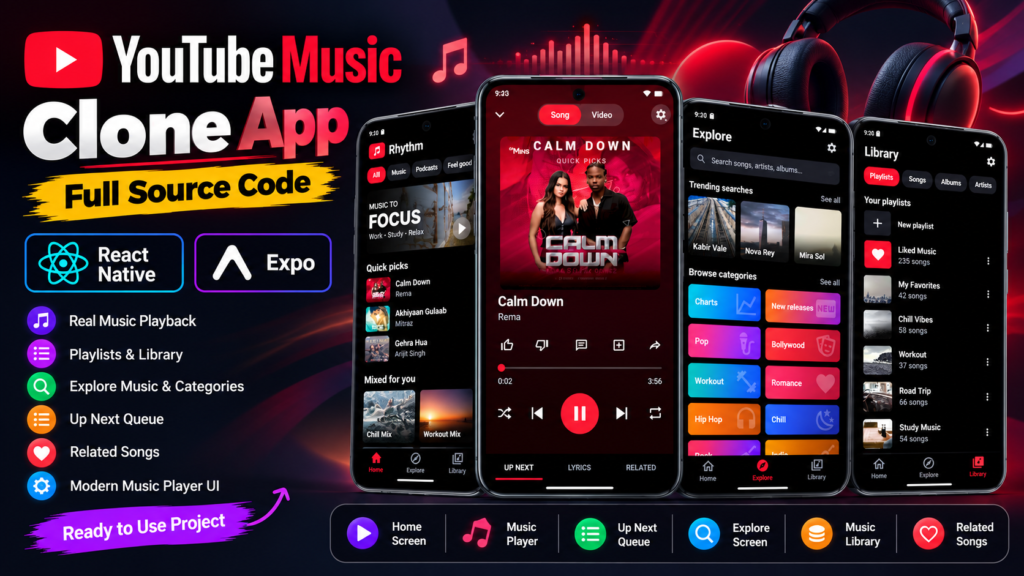
Looking to build a modern music streaming application using React Native? This YouTube Music App Clone Using React Native and Expo is a practical mobile app development project featuring a modern music interface, real music playback, an interactive audio player, music discovery, playlists, and a personalized music library.
Inspired by the familiar experience of popular music streaming applications, this project brings together essential music player features in a clean, dark-themed mobile interface. Unlike a static UI design or simple frontend demo, the project includes actual music playback functionality, allowing users to play, pause, skip, and navigate between songs.
Whether you are a React Native developer, mobile app development student, or someone looking for a ready-to-use music streaming app project, this source code provides a useful foundation for understanding and developing music applications.
Project Overview
The YouTube Music Clone is a mobile music player application developed using React Native and Expo. It features a modern music streaming interface with dedicated sections for discovering music, exploring categories, managing playlists, viewing upcoming songs, and listening to related tracks.
The application is designed around a smooth music-listening experience. Users can browse available songs, open the full-screen player, control playback, and explore different music sections without dealing with a complicated interface.
One of the main highlights is its functional audio player, which supports real music playback instead of displaying only a visual music player interface.
Project Highlights:
- Modern YouTube Music-inspired interface.
- Built using React Native and Expo.
- Actual music playback functionality.
- Interactive music player with playback controls.
- Home screen with quick picks and music mixes.
- Explore screen with trending searches and categories.
- Music library with playlists and songs.
- Up Next queue for upcoming tracks.
- Related songs recommendation screen.
- Dark-themed mobile application design.
Main Features of the YouTube Music Clone App
1. Modern Music App Home Screen
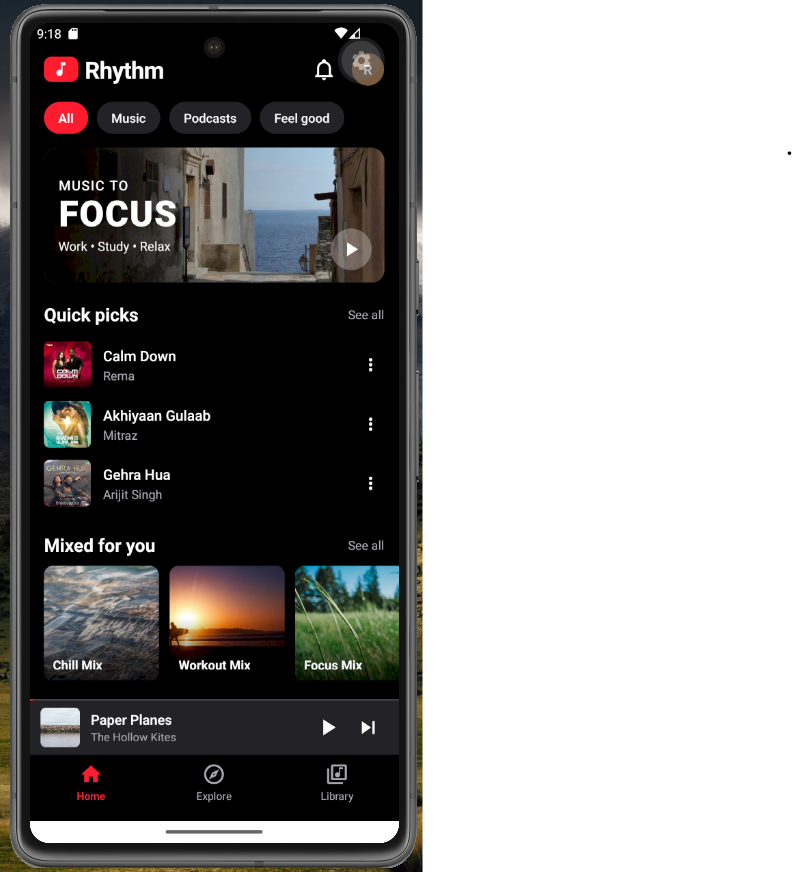
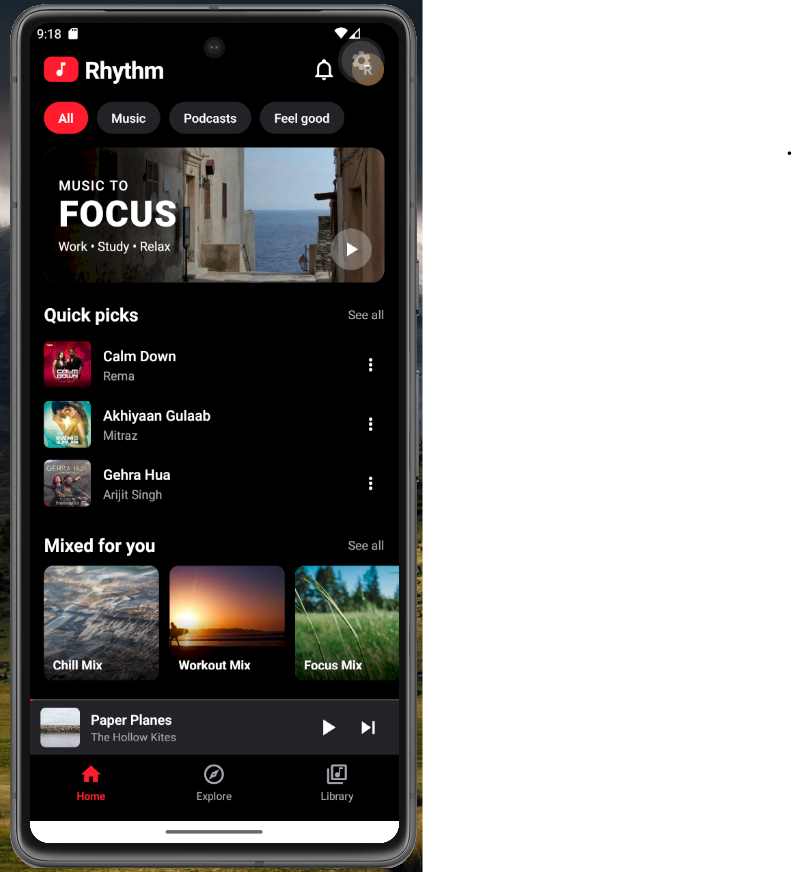
The home screen provides a personalized-style music discovery experience. It is designed to help users quickly access music and explore different listening options.
The interface includes a featured music banner, quick picks, and curated music mixes.
Home screen features:
- Music discovery banner.
- Quick Picks section.
- Featured songs with artist names and thumbnails.
- Mixed for You music collections.
- Music categories and navigation.
- Persistent mini music player.
The quick picks section provides convenient access to available tracks, while the music mix cards create a familiar streaming application experience.
2. Interactive Music Player Screen
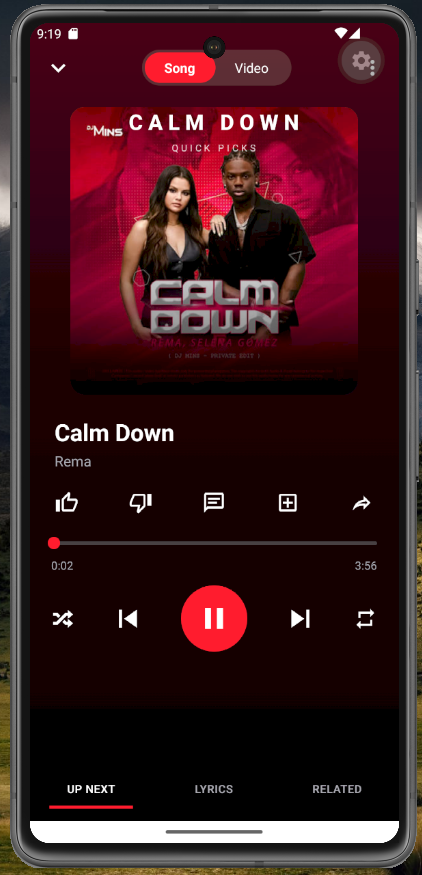
The music player is one of the most important components of this project.
It provides a dedicated playback interface with album artwork, song information, playback progress, and essential audio controls.
Users can interact with the player to manage music playback without navigating through multiple screens.
Music player functionality:
- Play and pause music.
- Play the next song.
- Play the previous song.
- Display album artwork.
- Show song title and artist name.
- Display playback progress.
- Seek through the track using the progress slider.
- Shuffle playback control.
- Repeat playback control.
- Like and dislike interface.
- Additional music interaction controls.
The large central playback button makes the primary music controls easy to access. The player also includes a compact navigation area for accessing Up Next, Lyrics, and Related sections.
3. Up Next – Upcoming Songs Queue
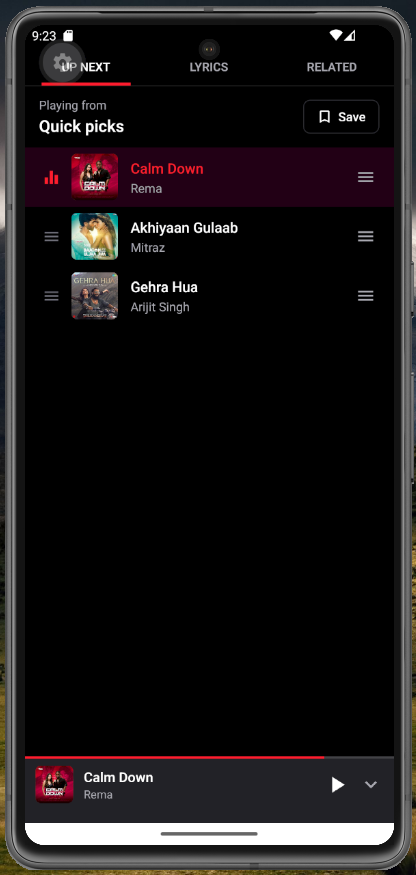
The Up Next screen displays the songs available in the current playback queue.
Users can see which song is currently playing and which tracks are scheduled to play next.
Up Next features:
- Display the currently playing song.
- List upcoming songs.
- Show song thumbnails and artist information.
- Highlight the active track.
- Display queue management controls.
- Save the current queue.
This screen makes it easier to understand the playback sequence and manage the listening experience.
4. Explore Screen – Discover New Music
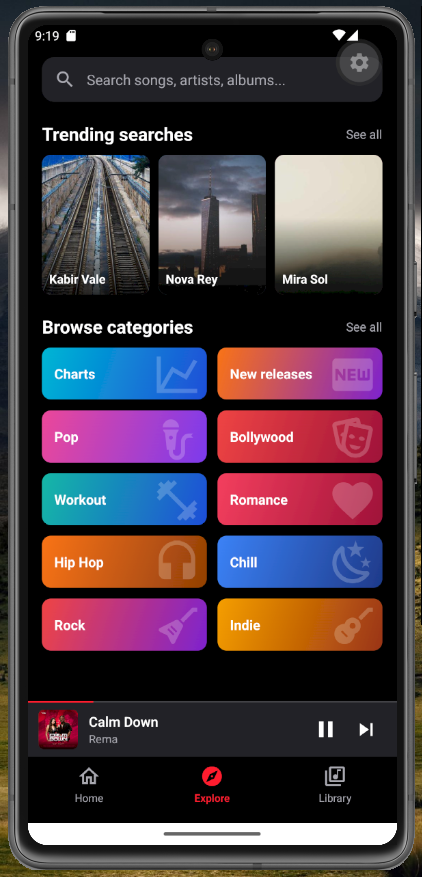
The Explore screen is designed for discovering different types of music and exploring available content.
It includes a search interface, trending searches, and visually attractive music categories.
Explore screen features:
- Search songs, artists, and albums.
- Trending searches section.
- Music category cards.
- Charts category.
- New Releases category.
- Pop and Bollywood categories.
- Workout and Romance categories.
- Hip Hop and Chill categories.
- Rock and Indie categories.
The colourful category cards and visual search section give the application a more engaging music discovery experience.
5. Music Library – Manage Your Collection
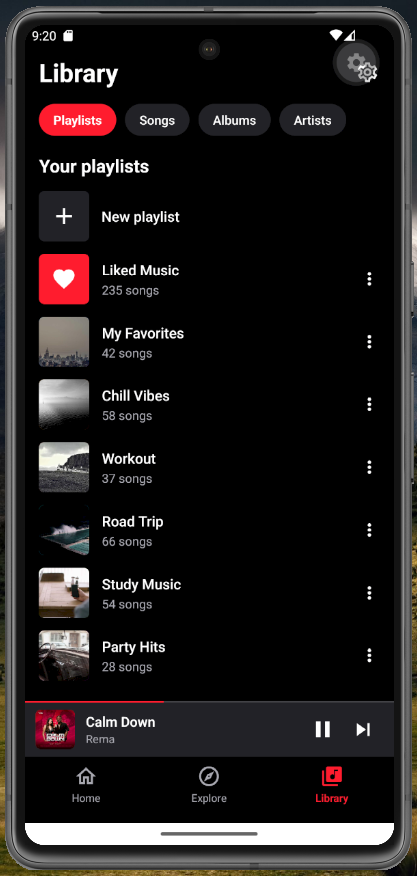
The Library screen provides a dedicated space for accessing and organizing music collections.
Users can switch between different library sections and browse their saved music content.
Library features:
- Playlists section.
- Songs section.
- Albums section.
- Artists section.
- Create a new playlist interface.
- Liked Music collection.
- My Favorites playlist.
- Chill Vibes playlist.
- Workout playlist.
- Road Trip playlist.
- Study Music playlist.
- Party Hits playlist.
Each playlist displays its thumbnail, name, and song count, making the music library visually organized and easy to navigate.
6. Related Songs – Discover Similar Music
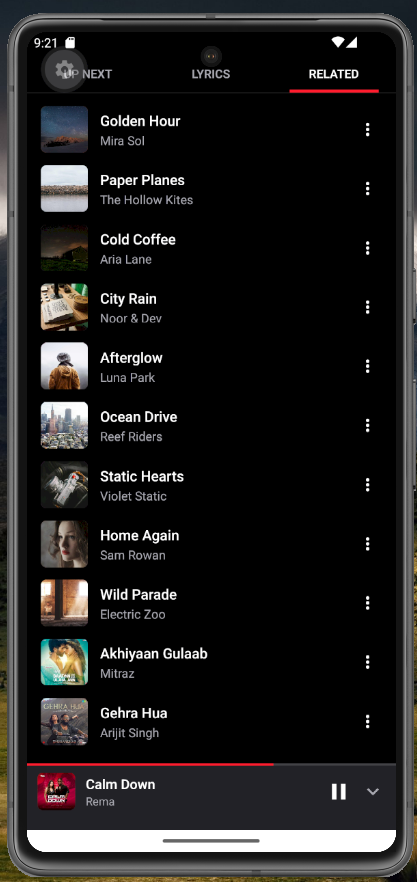
The Related Songs screen displays additional tracks associated with the current listening experience.
It provides another way for users to discover music without manually returning to the Explore screen.
Related songs features:
- Display a list of related tracks.
- Show song thumbnails.
- Display artist names.
- Access additional song options.
- Browse more music from the player interface.
This feature helps create a more complete music streaming application experience.
7. Mini Music Player
The application includes a persistent mini music player that appears at the bottom of the main screens.
It allows users to access playback controls while browsing other sections of the application.
Mini player features:
- Display current song artwork.
- Show song title and artist.
- Play and pause controls.
- Next song control.
- Playback progress indicator.
- Expand the player interface.
The mini player keeps music playback easily accessible while users explore the application.
Technologies Used
This YouTube Music Clone project is developed using modern React Native mobile development technologies.
| Technology | Purpose |
| React Native | Mobile application development |
| Expo | Development and application tooling |
| JavaScript | Application logic |
| React Components | Reusable UI components |
| Expo-compatible audio playback | Music playback functionality |
The project uses a component-based development approach, making the interface easier to understand, maintain, and extend.
Why Download This React Native Music Player Project?
Building a music streaming application from scratch involves several important development concepts, including audio playback, player controls, navigation, reusable components, and music library interfaces.
This project provides a practical starting point for developers who want to explore these concepts through a working mobile application.
You can use the source code to:
- Learn how to develop music player interfaces using React Native.
- Understand music playback integration in an Expo project.
- Build interactive audio player controls.
- Create playlist and music library interfaces.
- Develop music discovery and category screens.
- Understand mini-player and full-screen player layouts.
- Customize the application according to your requirements.
- Use the project as a foundation for your own music application.
Who Can Use This Project?
This project is suitable for:
- React Native developers.
- Expo application developers.
- Mobile app development students.
- Beginners learning React Native.
- Developers building music player applications.
- Students looking for practical mobile app projects.
- Developers exploring music streaming application concepts.
How to Run the React Native Expo Project
You can use the following general workflow to get started with the project.
Step 1: Download the source code
Download the complete project source code from the below Download Button.
Step 2: Install dependencies
Open the project directory in your development environment and install the required npm dependencies.
Step 3: Start the Expo development server
Run the Expo development command from the project directory.
Step 4: Open the application
Use an Android emulator, iOS simulator, or compatible physical device to run the application.
Step 5: Explore and customize
Explore the application screens, understand the components, and customize the music player, interface, and other features according to your requirements.
Note: Check the project’s included README and package configuration for the exact setup instructions and required dependencies.
Frequently Asked Questions (FAQs)
What is a YouTube Music Clone App?
A YouTube Music Clone App is a music application project inspired by the interface and listening experience of YouTube Music. It includes features such as music discovery, audio playback, playlists, a music library, and player controls.
Which technologies are used to build this music app?
This project is developed using React Native and Expo, with JavaScript for application functionality
Does this React Native music player support actual music playback?
Yes. The project includes actual music playback functionality, with controls for playing, pausing, skipping to the next song, and returning to the previous song.
Does the application include a music library?
Yes. The Library screen includes dedicated sections for playlists, songs, albums, and artists, along with collections such as Liked Music, Chill Vibes, Workout, and Party Hits.
Can I customize this music streaming app?
Yes. You can use the downloaded source code as a starting point and customize its UI, components, music categories, playlists, and other functionality.
Can I run this project using Expo?
Yes. The application is built using Expo and can be developed and tested using a compatible Expo development environment. Check the included project configuration for any additional native requirements.
Where can I download the React Native YouTube Music Clone source code?
You can download this React Native music streaming application project from SkillHost. Visit the project download section to access the available source code and project details.
Download YouTube Music Clone App Source Code
Ready to explore a modern music streaming application built with React Native and Expo?
Download the YouTube Music App Clone Using React Native source code from SkillHost and start exploring its music player, audio playback functionality, playlists, music library, Explore screen, and related songs interface.
Whether you want to learn React Native, understand audio player development, or build your own music application, this project gives you a practical foundation to get started.
Explore more React Native projects, mobile app templates, and developer resources on SkillHost.
Disclaimer: This is an independent educational development project inspired by the music discovery and playback experience of YouTube Music. It is not an official YouTube or YouTube Music application and is not affiliated with Google. All third-party names and trademarks belong to their respective owners.
More Interesting Projects to Explore
If you liked this YouTube Music App Clone Using React Native, check out other practical projects on SkillHost