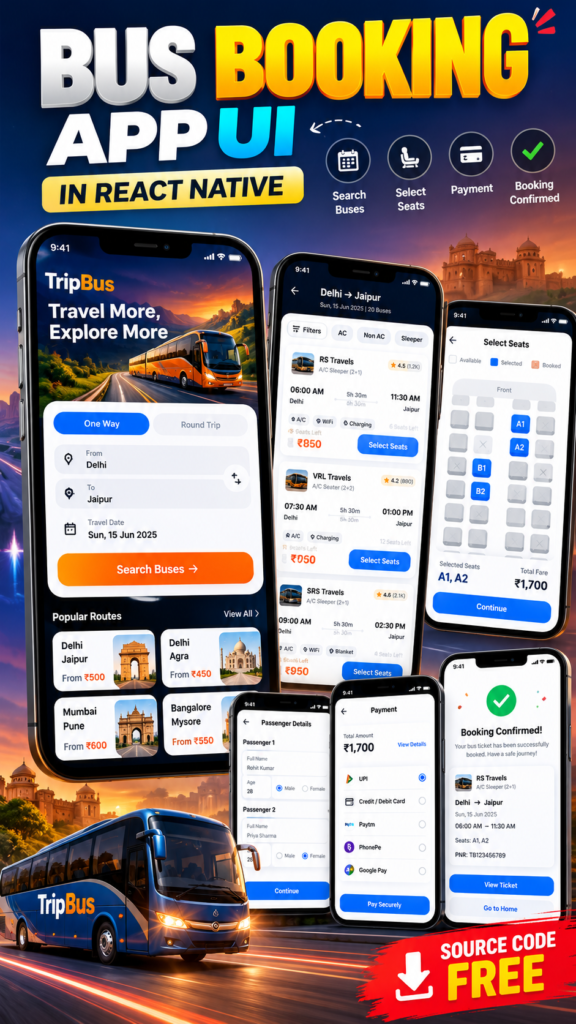
Looking for a modern React Native Bus Booking App UI for your next mobile application project? This project provides a complete bus ticket booking interface built with React Native, covering the complete user journey from searching for a bus to viewing the final booking ticket.
The project is designed as a React Native Bus Booking App UI project for developers who want to study or customize a real-world travel booking application interface. It includes multiple professionally designed screens such as the booking home screen, available bus listing, seat selection, pickup and drop selection, payment, and final ticket screens.
The project focuses entirely on the frontend and UI experience. No backend API or server-side integration is configured in this project. All bus information, routes, seats, prices, and booking information are presented through local/static data for demonstration purposes.
React Native Bus Booking App UI Features
This Bus Booking App UI includes the major screens required for a modern bus ticket booking application.
1. Modern Bus Booking Home Screen
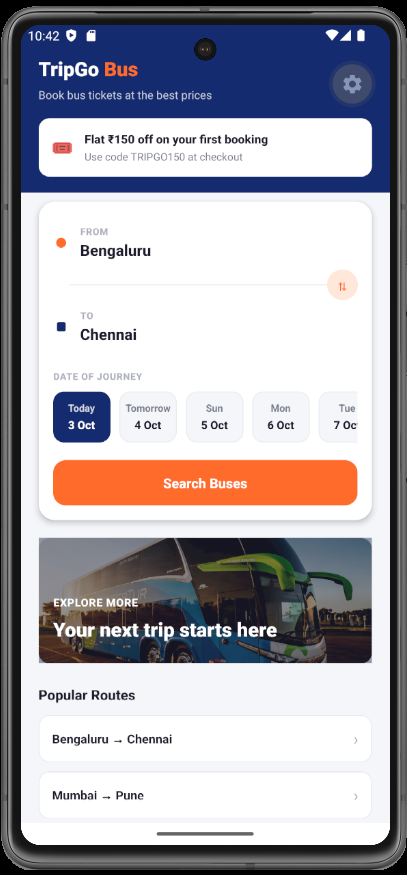
The home screen acts as the primary entry point of the application.
It includes a modern booking interface where users can start searching for available buses by entering their travel requirements.
The home screen includes:
- From location
- To location
- Travel date
- Booking search section
- Offer banner
- Popular routes
- Modern travel-focused UI
- Quick route discovery
- Responsive mobile layout
The booking interface is designed to make the main action immediately accessible to users.
The offer banner provides an additional promotional section that can later be connected to a backend or CMS when implementing the project in a production environment.
2. Popular Routes Section
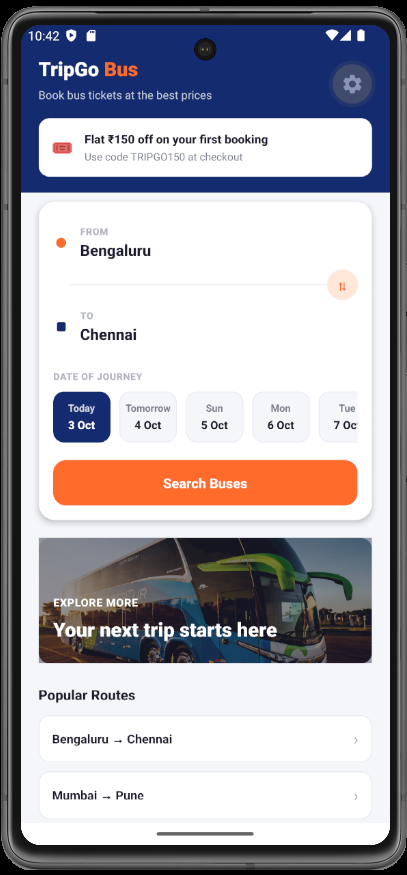
The home screen also contains a Popular Routes section.
This section displays commonly searched travel routes and gives users a quick way to discover available destinations.
For example, a production application could display routes such as:
- Delhi to Jaipur
- Mumbai to Pune
- Bangalore to Mysore
- Delhi to Agra
The current project uses local UI data, so developers can easily replace these routes with their own destinations later.
This makes the project useful as a starting point for developing a complete React Native Travel App UI.
3. Available Bus Listing Screen
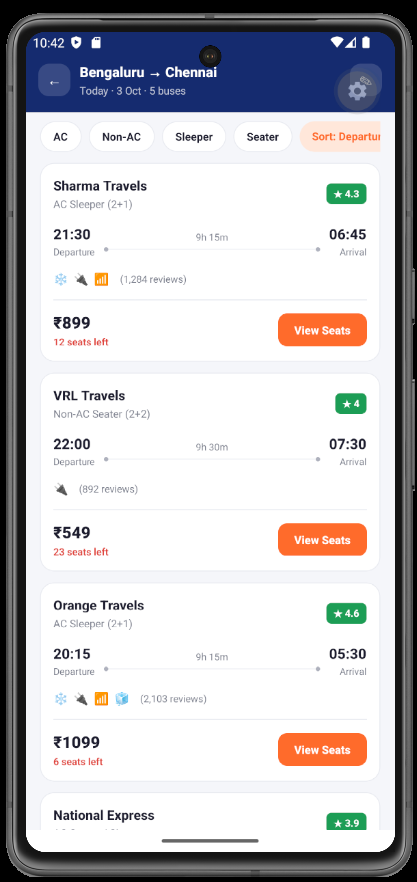
After searching for a route, users can view the available buses on the Bus Listing Screen.
The listing interface is designed to provide important information at a glance.
Each bus card can display information such as:
- Bus operator
- Departure time
- Arrival time
- Journey duration
- Bus type
- Available seats
- Ticket price
- Rating
- Amenities
- Seat selection action
This creates a realistic Bus Booking App UI experience similar to modern travel booking applications.
The listing screen is particularly useful for developers who want to understand how cards, pricing information, travel details, and booking actions can be organized inside a React Native application.
4. Bus Seat Selection Screen
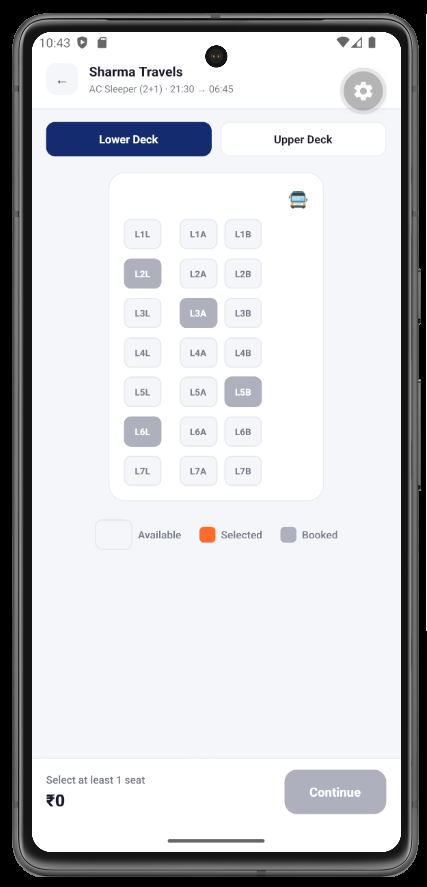
The project also includes a dedicated Bus Seat Selection UI.
Users can select available seats before continuing with their booking.
The seat selection screen visually separates different seat states, including:
- Available seats
- Selected seats
- Already booked seats
- Seat numbers
- Selected seat summary
- Total fare
This screen demonstrates how a React Native developer can create an interactive seat-booking interface without requiring a backend service.
The selected seats and calculated booking information are handled within the frontend UI flow.
5. Pickup and Drop Selection Screen
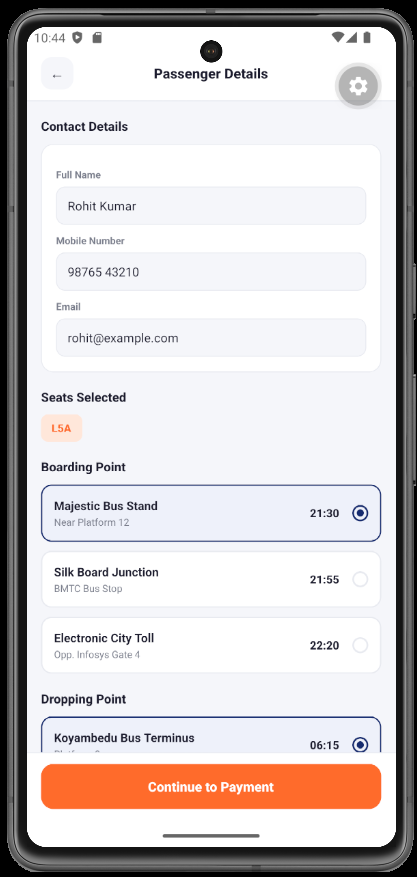
A dedicated Pickup and Drop Selection Screen is included in the project.
Users can select their preferred boarding point and destination drop point.
The interface can display multiple pickup locations and drop locations, allowing the user to select the most convenient option.
Typical information can include:
- Pickup location
- Pickup time
- Drop location
- Drop time
- Location name
- Location address
- Selection state
This is an important feature for a realistic Bus Ticket Booking App, because bus operators frequently have multiple boarding and dropping points.
6. Payment Screen
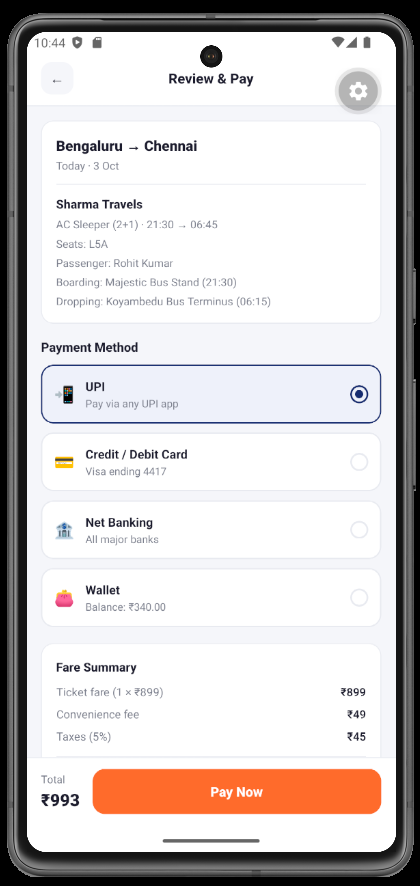
After selecting the bus, seats, and pickup/drop locations, users can proceed to the payment screen.
The Bus Booking Payment UI provides a final review of the booking information before payment.
The screen can contain:
- Selected bus
- Journey route
- Travel date
- Selected seats
- Passenger information
- Fare summary
- Payment method
- Total amount
- Payment action
The payment interface is included strictly as a frontend demonstration.
No Real Payment Gateway
This project does not integrate Razorpay, Stripe, PayPal, or another payment gateway.
There is also no payment API configured.
The payment screen is therefore intended to demonstrate the user interface and booking flow only.
Developers can later integrate their preferred payment provider when adding a backend and production payment infrastructure.
7. Final Bus Ticket Screen
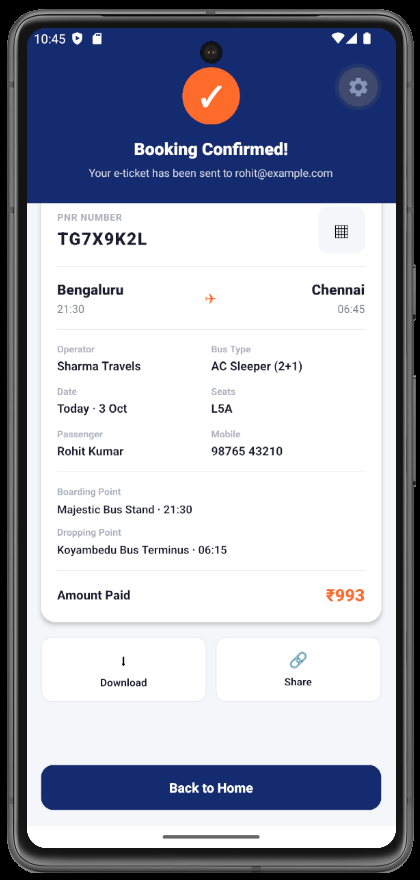
After completing the frontend booking flow, users reach the final Bus Ticket Screen.
This screen provides a visual representation of the completed booking.
The ticket interface can show:
- Booking confirmation
- Bus operator
- From and To locations
- Travel date
- Departure time
- Arrival time
- Selected seats
- Passenger information
- Booking reference
- Ticket information
The final screen gives the project a complete end-to-end booking experience.
Instead of stopping after the payment screen, the user gets a dedicated ticket interface that represents the final stage of the booking journey.
Complete Bus Booking User Flow
The project follows a straightforward booking workflow:
Home Screen → Bus Search → Available Buses → Seat Selection → Pickup & Drop → Payment → Final Ticket
This makes the project suitable for developers who want to demonstrate a complete React Native Booking App rather than a collection of unrelated UI screens.
The complete flow allows developers to understand how multiple React Native screens can work together to create a realistic travel booking experience.
React Native Bus Booking App Project Structure
The project follows a modular structure rather than placing the entire application inside a single file.
The architecture separates screens, reusable components, navigation, mock data, and theme configuration.
A typical structure looks like this:
src/
├── screens/
│   ├── HomeScreen.js
│   ├── BusListScreen.js
│   ├── SeatSelectionScreen.js
│   ├── PassengerDetailsScreen.js
│   ├── PickupDropScreen.js
│   ├── PaymentScreen.js
│   └── BookingSuccessScreen.js
│
├── components/
│   ├── BusCard.js
│   ├── PrimaryButton.js
│   └── ScreenHeader.js
│
├── navigation/
│   └── AppNavigator.js
│
├── data/
│   └── buses.js
│
├── theme/
│   ├── colors.js
│   └── spacing.js
│
└── utils/
This approach makes the project easier to maintain and extend.
Developers can independently modify the home page, bus listing, seat selection, payment screen, or ticket screen without turning the entire application into one large component.
No Backend API Required
One of the important aspects of this React Native Bus Booking App Source Code is that it does not depend on a backend API.
There is currently:
- No REST API
- No GraphQL API
- No Node.js backend
- No PHP backend
- No database
- No authentication server
- No payment gateway
- No external bus booking API
The project uses local/static data for demonstrating the interface.
This makes it easier for developers to download the project, install the dependencies, and explore the UI without having to configure a server before running the application.
Can This Project Be Connected to an API Later?
Yes.
The current frontend structure can be extended with a backend when required.
For example, a production application could connect the bus listing to an API such as:
GET /api/buses
The frontend could then retrieve:
- Available buses
- Routes
- Departure times
- Arrival times
- Seat availability
- Prices
- Bus operators
Similarly, the booking flow could eventually connect to APIs for:
GET  /api/routes
GET  /api/buses
GET  /api/seats
POST /api/bookings
POST /api/payments
GET  /api/tickets/{id}
Those integrations are intentionally not included in the current project because this version focuses on the React Native UI and frontend experience.
Who Can Use This React Native Bus Booking UI?
This project can be useful for:
- React Native developers
- Frontend developers
- Mobile app developers
- Students learning React Native
- Developers building travel applications
- UI/UX designers
- Developers creating portfolio projects
- Developers looking for a bus booking app template
- Developers experimenting with mobile booking flows
It can also be used as a foundation for a larger React Native Travel App.
Why This Project Is Useful for Learning React Native
A bus booking application is a good practical project because it combines several common mobile development patterns.
You can learn how to implement:
- Screen navigation
- Form inputs
- Selection components
- Date selection
- List rendering
- Reusable cards
- Interactive seat selection
- Booking summaries
- Payment interfaces
- Conditional UI states
- Local application state
- Component-based architecture
Instead of building a simple counter or basic CRUD interface, developers can use this project to study a realistic multi-screen application flow.
Customization Options
The UI can be customized according to the requirements of a specific bus booking platform.
Developers can modify:
- Brand name
- Logo
- Colors
- Typography
- Bus cards
- Route information
- Offer banners
- Popular destinations
- Seat layout
- Payment methods
- Ticket design
- Navigation
- Mock bus data
The local data architecture also makes it straightforward to replace the demonstration data with real API responses later.
Important Project Limitation
This project is a frontend UI project, not a complete production bus reservation system.
The application does not currently communicate with a server.
Therefore, it should not be considered a production-ready ticket reservation platform.
Real-world deployment would require additional systems for:
- User authentication
- Bus inventory
- Real-time seat availability
- Booking management
- Database storage
- Payment processing
- Payment verification
- Ticket generation
- Booking cancellation
- Refund processing
- Notifications
- Operator management
- Backend security
Those features can be implemented separately when converting the UI project into a complete bus booking platform.
Download React Native Bus Booking App Source Code
If you are looking for a React Native Bus Booking App UI with Source Code, this project provides a complete frontend booking experience with modern screens and reusable components.
The project includes the home booking interface, promotional offer banner, popular routes, available bus listing, seat selection, pickup and drop selection, payment screen, and final bus ticket screen.
It is particularly suitable for developers who want a ready-made React Native Bus Booking App Project that can be customized or extended with their own backend.
Download the project from SkillHost and start building your own React Native travel booking application.
Frequently Asked Questions
Is this a complete bus booking application?
No. It is a frontend React Native Bus Booking App UI project. The complete user interface and booking flow are included, but backend services are not.
Does this project use an API?
No. No backend API is configured or called by this project. Bus and booking information is represented using local/static data.
Does the project include a payment gateway?
No. The payment screen is a UI demonstration. No real payment transaction is processed.
Can I connect my own backend API?
Yes. The project structure is modular, so developers can replace the local mock data with API services later.
Does it include seat selection?
Yes. The project includes an interactive bus seat selection UI with available and selected seat states.
Does it include pickup and drop selection?
Yes. A dedicated pickup and drop selection screen is included in the booking flow.
Does it include a final ticket screen?
Yes. After the payment stage, the application displays a final booking/ticket screen.
Is this project suitable for React Native beginners?
Yes. It is also useful for intermediate developers because it demonstrates a multi-screen application architecture and reusable React Native components.
Conclusion
This React Native Bus Booking App UI provides a modern frontend implementation of a complete bus ticket booking experience.
From the initial search interface and popular routes to bus listings, seat selection, pickup and drop selection, payment, and the final ticket, the project covers the major UI stages expected in a modern bus booking application.
Because the project does not depend on backend APIs, databases, or payment services, developers can focus on understanding and customizing the React Native frontend before adding production services.
For developers searching for a React Native Bus Booking App, Bus Booking App UI, React Native Travel App UI, or Bus Booking App Source Code, this project provides a practical starting point for building and extending a modern mobile booking application.
Explore More Projects
🚀 Looking for more interesting React Native projects, UI templates, developer tools, and ready-to-use source code? Explore more projects on SkillHost and discover your next development project.