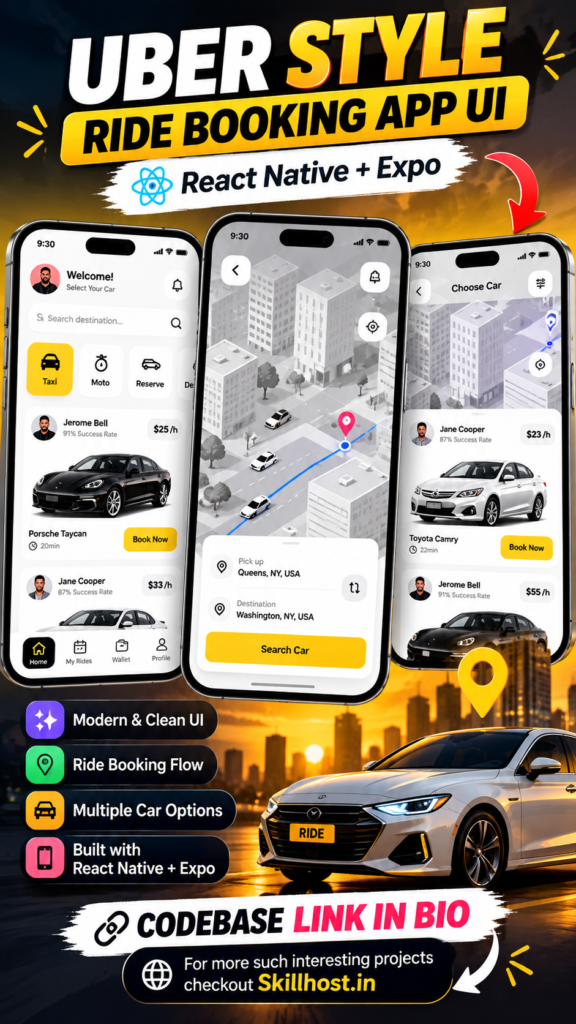
Looking for a modern React Native Ride Booking App with Source Code for your next mobile app project?
This project is a clean and modern ride-booking mobile application UI built with React Native and Expo. It provides a complete frontend experience for exploring available rides, selecting a vehicle, choosing a pickup location and going through a simple booking confirmation flow.
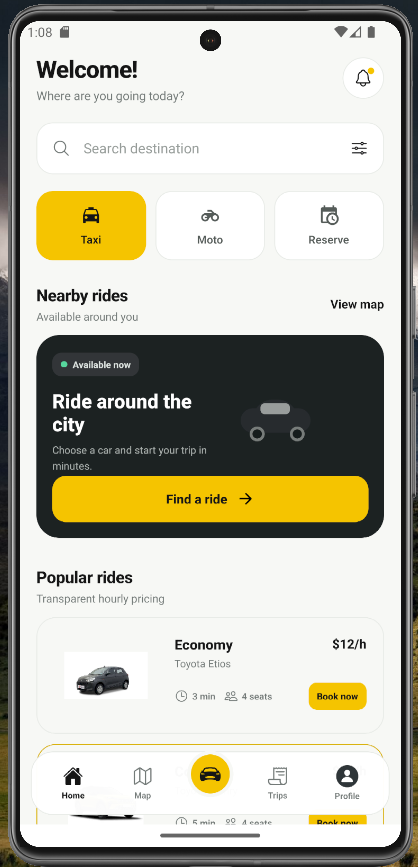
The project is designed for developers, students and React Native learners who want to build a professional-looking ride booking app UI without dealing with backend development, databases or third-party APIs.
You can download the source code, run the project with Expo and customize the interface according to your own application requirements.
Note: This is an independent UI project inspired by modern ride-hailing applications. It is not affiliated with or endorsed by Uber.
🚗 React Native Ride Booking App
Ride-booking applications need a simple interface that allows users to quickly find a ride, select a vehicle and confirm their journey.
This React Native Ride Booking App with Source Code focuses on exactly that frontend experience.
The application includes a modern home screen, destination search, ride categories, vehicle cards, map-style booking interface and confirmation screen.
The UI has been designed with a clean visual style, rounded cards, strong call-to-action buttons and an easy-to-understand navigation structure.
Whether you are learning React Native or building a prototype for a taxi or transportation application, this project provides a useful starting point.
✨ Features of the React Native Ride Booking App
The project contains several practical screens and interactive UI components.
🏠 Modern Home Screen
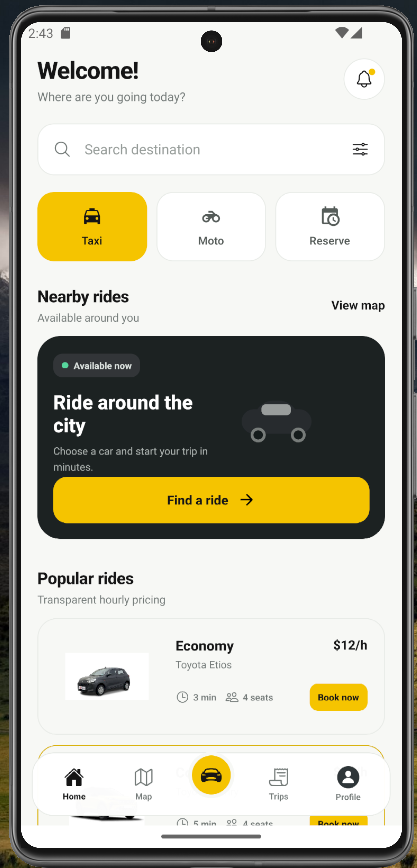
The home screen provides users with quick access to the main ride-booking features.
It includes:
- Welcome section
- User profile area
- Notification icon
- Destination search
- Ride categories
- Nearby rides
- Popular vehicles
- Quick booking buttons
- Bottom navigation
The layout is designed to keep important actions visible without making the interface feel complicated.
🔎 Destination Search UI
Users can search for their destination directly from the home screen.
The search interface provides a clean input area that can later be connected to a real location or places API.
For this version, the search functionality is intentionally frontend-only.
This means developers can run the project without configuring Google Maps, Mapbox or another location service.
🚕 Taxi, Moto and Reserve Options
The React Native taxi booking app UI includes different transportation categories.
Users can switch between:
- Taxi
- Moto
- Reserve
The currently selected category receives a highlighted visual state so that users can easily understand which ride type they have selected.
This component can also be extended with additional categories such as:
- Premium
- SUV
- Electric
- Carpool
- Rental
🚘 Multiple Vehicle Options
A ride-booking application needs to provide users with different vehicle choices.
The project includes vehicle cards showing information such as:
- Vehicle name
- Vehicle model
- Price
- Estimated arrival time
- Number of seats
- Book Now button
Example vehicles include:
Economy
Toyota Etios
Comfort
Toyota Camry
Premium
Tesla Model 3
These are sample UI data and can easily be replaced with your own vehicles.
🗺️ Ride Booking Map UI
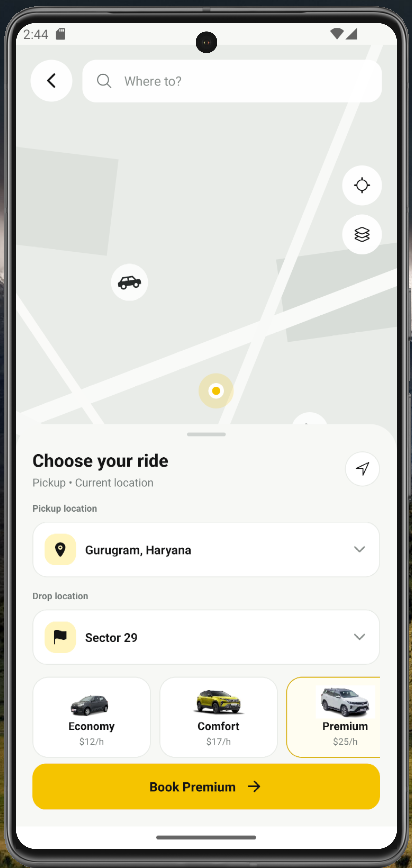
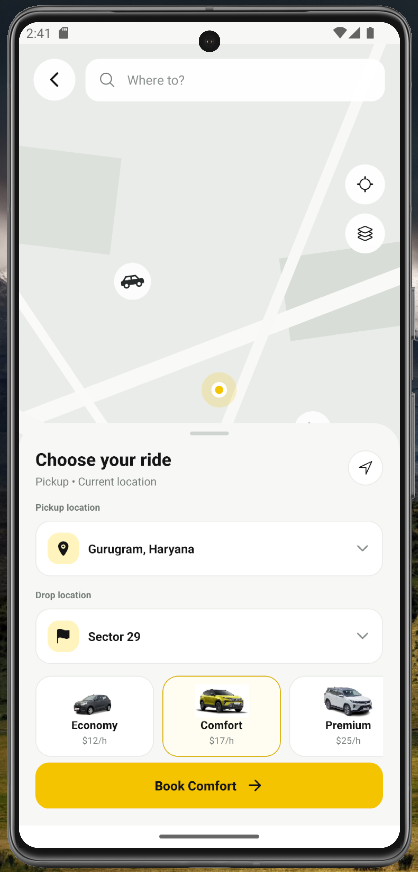
The project includes a custom map-style interface designed for the booking experience.
The map UI displays elements such as:
- Pickup location
- Destination
- Vehicle locations
- Map controls
- Roads and buildings
- Location marker
- Available vehicles
The map is intentionally a frontend mockup.
No external maps API is required.
This makes the project easy to download and run without needing API keys or billing configuration.
If you later want to convert this into a production application, you can replace the mock map with Google Maps, Mapbox or another mapping solution.
📍 Pickup Location Screen
The booking interface includes a pickup location section where users can see their current pickup point.
The interface is structured so that it can later be connected to:
- GPS location
- Google Maps
- Mapbox
- Places API
- Geolocation services
- Backend location services
For the current project, the location is simply local UI data.
🚗 Select Your Ride
After opening the booking interface, users can select their preferred vehicle.
Each vehicle option displays useful information such as:
- Vehicle type
- Vehicle model
- Price
- Estimated arrival time
- Seating capacity
The selected vehicle is visually highlighted, providing immediate feedback to the user.
This interaction demonstrates how React Native UI state management can be used to build an interactive mobile application.
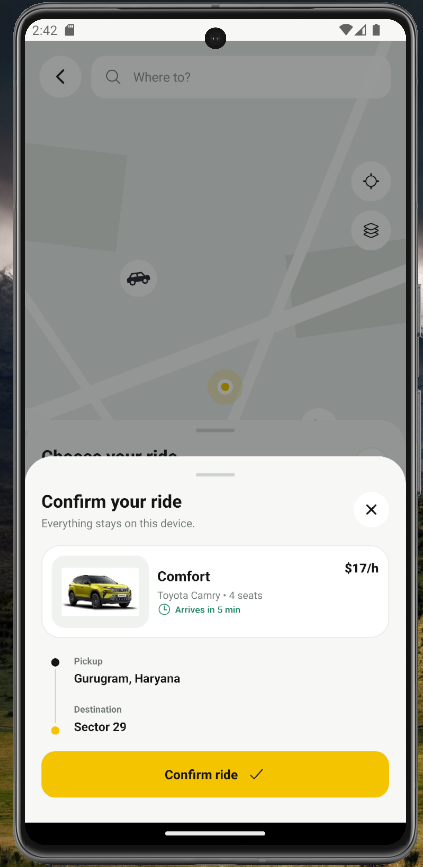
📋 Booking Confirmation
After selecting a vehicle, users can open a booking confirmation screen.
The confirmation interface includes:
- Selected vehicle
- Vehicle model
- Pickup location
- Destination
- Estimated arrival time
- Ride price
- Confirm Ride button
The flow is designed to simulate a real ride-booking experience while keeping everything on the frontend.
🎨 Clean and Modern Mobile UI
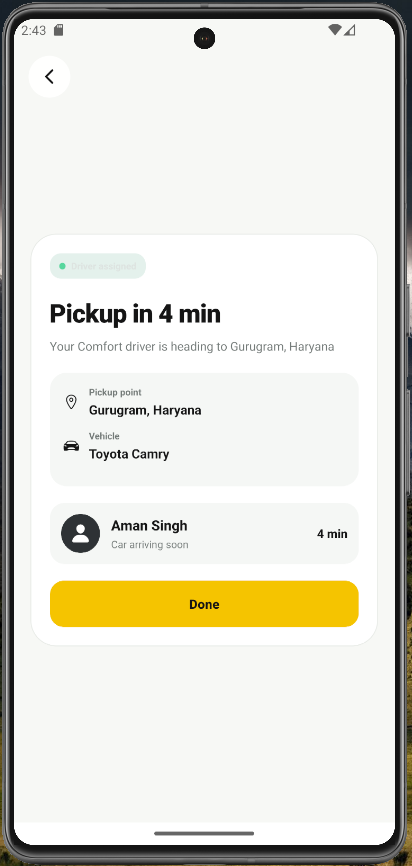
The project follows a modern mobile UI design approach.
Some of the design elements include:
- Rounded cards
- Large touch-friendly buttons
- Minimal color palette
- High-contrast CTA buttons
- Clean typography
- Bottom navigation
- Interactive selection states
- Mobile-first layout
The yellow and dark color combination gives the application a strong transportation-app visual identity.
You can easily replace the colors with your own brand colors.
🛠️ Technologies Used
This React Native Ride Booking App with Source Code is built using modern frontend technologies.
React Native
React Native is used to create the cross-platform mobile application interface.
Expo
Expo provides a simple development environment for running and testing the React Native application.
JavaScript
The project uses JavaScript for the application logic and interactive UI state.
Expo Vector Icons
Icons are provided through Expo-compatible icon libraries.
React State
Local React state is used for interactions such as:
- Ride selection
- Category selection
- Booking modal
- Screen navigation
- Search input
📱 Is This a Full Ride Booking Application?
No.
This project is primarily a frontend UI project.
It does not include a production backend or real ride-booking infrastructure.
The project does not include:
- User authentication
- Driver authentication
- Backend APIs
- Database
- Real-time driver tracking
- Payment gateway
- Driver dispatch system
- GPS tracking
- Push notifications
- Admin dashboard
- Real Google Maps integration
Instead, it provides the frontend foundation required to build these features later.
🔌 No Backend or API Required
One of the biggest advantages of this project is that it can be run without configuring a backend server.
You don’t need:
- Node.js backend
- PHP backend
- Laravel
- Symfony
- Firebase
- MySQL
- PostgreSQL
- Google Maps API
- Payment API
The included UI uses local sample data and React state.
This makes it especially useful for developers who want to focus on React Native UI development before implementing backend functionality.
💻 How to Run the React Native Project
After downloading the source code, open the project directory in your terminal.
Step 1: Install dependencies
npm installStep 2: Start Expo
npx expo startYou can then run the application using:
- Expo Go
- Android Emulator
- iOS Simulator
- Web browser
No backend server is required for the included project.
📦 React Native Ride Booking App Source Code
If you are searching for React Native ride booking app source code, this project provides a practical frontend starting point.
You can modify the source code to create your own:
- Taxi booking application
- Cab booking app
- Ride-hailing app
- Transportation app
- Car rental interface
- Vehicle reservation application
You can customize almost every part of the UI, including colors, vehicle information, pricing, navigation and booking screens.
🎯 Who Is This Project For?
This React Native Ride Booking App with Source Code can be useful for:
React Native Developers
Use the project as a frontend foundation for a transportation application.
Students
The project can be useful for college projects and React Native learning.
Beginners
It provides an example of how multiple React Native components can work together to create a complete application flow.
UI/UX Designers
Use the interface as inspiration for designing ride-booking experiences.
Freelancers
The project can help you prototype a taxi or transportation application before developing backend functionality.
Hackathon Developers
The UI can provide a starting point when building a ride-booking concept quickly.
🚀 How Can You Extend This Project?
The current project is intentionally frontend-only, but you can extend it into a complete ride-booking platform.
🔐 Add Authentication
You could add:
- Login
- Registration
- OTP verification
- Forgot password
- User profile
- Driver profile
🗺️ Add Real Maps
Replace the existing mock map with a real mapping service.
Possible integrations include:
- Google Maps
- Mapbox
- Geolocation APIs
- Places APIs
This would allow you to implement real pickup and destination locations.
👨✈️ Build a Driver App
A complete ride-booking ecosystem could include a separate driver application.
Drivers could:
- Go online
- Receive ride requests
- Accept rides
- Reject rides
- View passenger information
- Navigate to pickup
- Start the ride
- Complete the ride
💳 Add Payment Integration
You can integrate a payment provider to support:
- UPI
- Credit cards
- Debit cards
- Wallets
- Online payments
- Payment history
⚡ Add Real-Time Ride Tracking
A production ride-hailing application could use real-time communication to update:
- Driver location
- Ride status
- Estimated arrival
- Trip progress
Technologies such as WebSockets, Firebase or other real-time services can be integrated depending on the architecture.
🧑💻 Why Build the UI Before the Backend?
Starting with the UI can make development easier.
You can first validate the complete user journey:
Home → Search → Select Ride → Pickup → Confirm Booking
Once the frontend experience is finalized, backend services can be connected to the existing screens.
This approach also makes it easier to identify UX problems before spending time developing APIs, databases and authentication systems.
🔥 React Native Ride Booking App with Source Code – Project Highlights
Here’s a quick overview of what you get:
| Feature | Included |
|---|---|
| React Native UI | ✅ |
| Expo | ✅ |
| Ride categories | ✅ |
| Taxi UI | ✅ |
| Moto UI | ✅ |
| Vehicle selection | ✅ |
| Booking flow | ✅ |
| Map-style UI | ✅ |
| Pickup UI | ✅ |
| Booking confirmation | ✅ |
| Backend | ❌ |
| Database | ❌ |
| Real Maps API | ❌ |
| Payment Gateway | ❌ |
| Real-time Tracking | ❌ |
| Driver System | ❌ |
📥 Download the Source Code
Ready to experiment with the project?
Download the React Native Ride Booking App with Source Code and start customizing it for your own mobile application.
👉 Download Source Code
You can modify the UI, replace the sample vehicle data, add your own branding and connect it to your preferred backend later.
❓ Frequently Asked Questions
What is this React Native Ride Booking App?
It is a frontend ride-booking application UI created with React Native and Expo. It demonstrates the main screens and interactions commonly found in taxi and ride-hailing applications.
Is this a complete Uber clone?
No. It is an independent ride booking app UI and is not an official Uber application or Uber clone with production backend functionality.
Does the project include source code?
Yes. The project is provided with its React Native source code.
Does it use Expo?
Yes. The application is built to work with Expo.
Does it require a backend?
No. The included project works with local UI data and does not require a backend server.
Does it require Google Maps API?
No. The included map is a frontend UI mockup.
Can I add a real map later?
Yes. You can replace the mock map with Google Maps, Mapbox or another mapping provider.
Can I customize the design?
Yes. You can customize the colors, typography, cards, vehicle data, navigation and booking screens.
Can I connect this to my own API?
Yes. The frontend can later be connected to a REST API or another backend architecture.
Can beginners use this project?
Yes. It can be useful for developers learning React Native components, state management, navigation patterns and mobile UI development.
🏁 Conclusion
Building a modern ride-booking application involves much more than creating a simple vehicle list. The user needs a clear journey from searching for a destination to selecting a vehicle and confirming the ride.
This React Native Ride Booking App with Source Code provides that frontend experience in a clean and customizable Expo project.
You can use it as a learning project, UI prototype, college project, hackathon project or starting point for a larger taxi and ride-hailing application.
Download the source code, customize the interface and connect your own backend services when you’re ready to move from a UI prototype to a fully functional application.
Explore more React Native projects, mobile app source code and development projects on SkillHost.in.