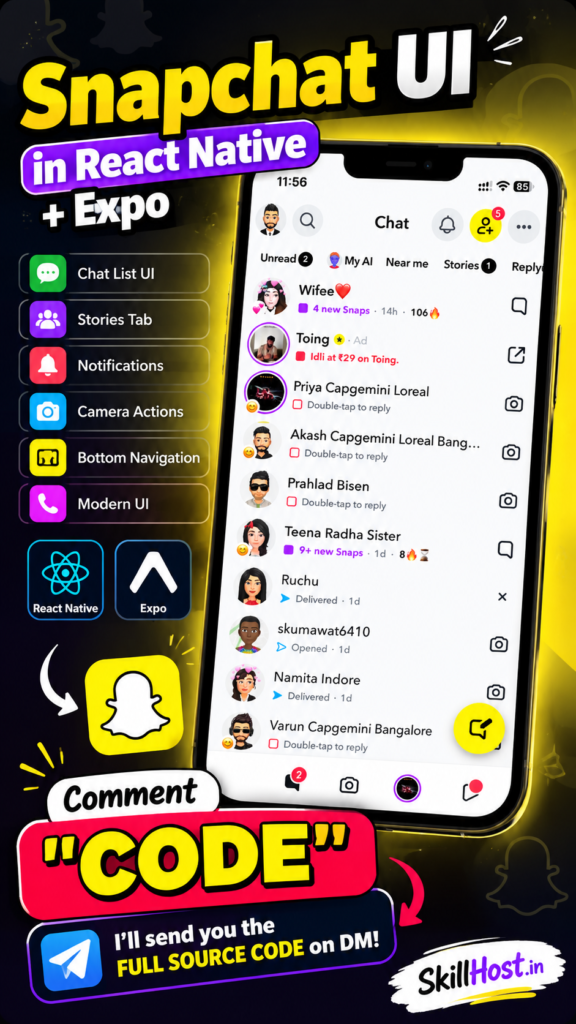
Looking for a practical React Native UI project with source code to improve your mobile app development skills? In this project, we recreated a modern Snapchat-inspired chat interface using React Native and Expo.
This React Native Snapchat UI with Source Code project focuses on recreating the visual experience of a modern social messaging application, including a chat list, unread indicators, stories, notification badges, camera actions, floating action buttons and bottom navigation.
The project is suitable for developers who want to learn how to create polished mobile interfaces using React Native without depending on a large third-party UI framework.
What Is This React Native Snapchat UI Project?
This project is a Snapchat-inspired mobile UI built with React Native and Expo.
The goal is not to reproduce Snapchat’s backend or proprietary functionality. Instead, it provides a frontend UI concept that developers can use for learning, prototyping and building their own social-media or messaging applications.
The main screen contains a chat list with different message states, user avatars, Snap-style indicators, timestamps, notification badges and action buttons.
The entire interface is built using React Native components and styles, making it easy to customize for your own application.
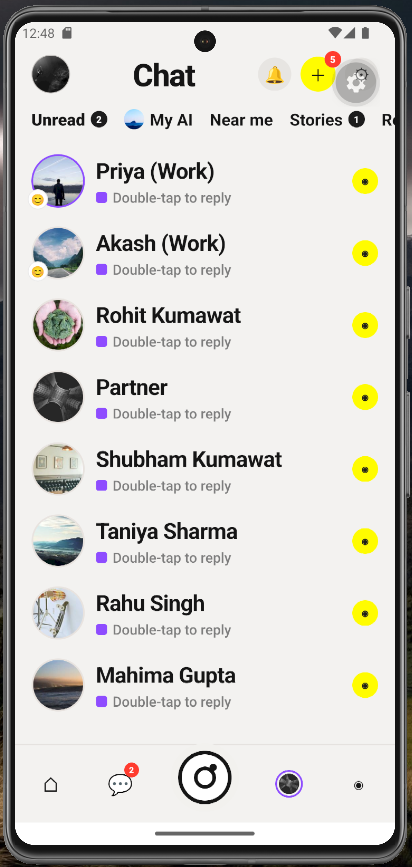
React Native Snapchat UI Features
This React Native Snapchat UI with Source Code includes several common features found in modern messaging applications.
1. Snapchat-Style Chat Screen
The main screen displays a vertically scrollable list of conversations.
Each conversation contains:
- User avatar
- User name
- Message status
- Timestamp
- Unread indicators
- Snap-style status indicators
- Camera button
- Chat/reply action
- Additional notification information
This makes the project useful as a starting point for a React Native chat UI.
2. Top Navigation
The top section contains a modern mobile navigation layout with:
- Profile button
- Search button
- Chat title
- Notification button
- Add-friend button
- More options button
The layout is designed to resemble the compact navigation patterns commonly used by modern social applications.
3. Unread and Story Tabs
The horizontal navigation includes categories such as:
- Unread
- My AI
- Near me
- Stories
- Replies
Unread counts are displayed using notification badges.
You can easily replace these tabs with your own application categories.
4. Notification Badges
The UI includes notification badges for displaying unread counts.
For example:
Unread 2
Stories 1
There is also a notification badge on the add-friend button.
These components can later be connected to an API or state management system.
5. Chat Status Indicators
Different conversations use different status indicators such as:
- New Snaps
- Delivered
- Opened
- Double-tap to reply
- Timestamps
- Streak indicators
This makes the project more realistic than a simple static chat list.
6. Camera Actions
Individual conversations include camera actions that can later be connected to a camera screen.
You can connect these buttons to Expo Camera or your own camera implementation.
7. Floating Action Button
A large yellow floating action button is included above the bottom navigation.
This can be used to open:
- New chat
- Camera
- Create Snap
- Compose message
- Create story
depending on your application’s requirements.
8. Bottom Navigation
The project also contains a five-item bottom navigation interface.
It includes icons representing:
- Location
- Chat
- Camera
- Stories
- Messages
The navigation is currently UI-focused and can be connected to React Navigation for a complete application.
Technologies Used
This project uses a simple and beginner-friendly technology stack.
React Native
React Native is used to build the mobile interface using JavaScript and React components.
Expo
Expo simplifies React Native development by providing tools and libraries that make it easier to develop, test and build mobile applications.
JavaScript
The project is written in JavaScript using functional React components.
Expo Vector Icons
The interface uses icons from @expo/vector-icons for elements such as:
- Search
- Notifications
- Camera
- Chat
- Location
- More options
- User actions
React Native StyleSheet
The UI styling is implemented using React Native’s built-in StyleSheet API instead of relying on a large UI component library.
React Native Snapchat UI Project Structure
A simplified version of the project structure looks like this:
snapchat-ui/
│
├── App.js
├── app.json
├── README.md
└── package.json
The main UI is contained inside App.js, making the project easy to understand for beginners.
The chat data is also structured separately inside the component, so developers can easily replace the static data with API responses.
How to Run the React Native Snapchat UI
You can run this project using Expo.
First, create a new Expo application:
npx create-expo-app@latest snapchat-uiMove into the project:
cd snapchat-uiInstall the required icon package if it isn’t already included:
npx expo install @expo/vector-iconsReplace the generated App.js with the source code from this project.
Then start the Expo development server:
npx expo startYou can then open the application using:
- Android Emulator
- iOS Simulator
- Expo Go
- Development build
How This Project Can Be Extended
The current project is primarily a UI/UX implementation. You can turn it into a complete messaging application by adding backend functionality.
Add User Authentication
You can add:
- Email/password authentication
- Google login
- Apple login
- Phone authentication
- User profiles
Firebase, Supabase or a custom PHP/Symfony/Laravel backend can be used.
Add Real-Time Chat
The static chat list can be replaced with real-time messaging using technologies such as:
- Firebase
- WebSockets
- Pusher
- Socket.IO
You could then implement:
Sent
Delivered
Opened
Typing...
Online
Offline
Add Camera Functionality
The camera button can be connected to Expo’s camera functionality to allow users to capture photos and videos.
You could then add:
- Camera preview
- Flash
- Front/back camera
- Photo capture
- Video recording
- Media preview
Add Stories
The Stories tab can be expanded into a complete stories feature with:
- Image stories
- Video stories
- Story viewer
- Story expiration
- Viewed/unviewed indicators
Add Push Notifications
Push notifications can be added for:
- New messages
- Friend requests
- Story interactions
- New snaps
- Mentions
Why Build a Snapchat-Inspired UI in React Native?
Creating interfaces based on familiar mobile application patterns is a useful way to practice React Native.
Instead of starting with a blank screen, developers can work on practical UI components such as chat lists, navigation bars, badges, avatars and interactive buttons.
This project can help you practice:
- React components
- Props
- State management
- FlatList/ScrollView
- Flexbox
- React Native styling
- Mobile navigation
- Component reusability
- UI responsiveness
- Icon integration
It can also serve as a foundation for a larger React Native social media app.
Who Can Use This Project?
This project can be useful for:
React Native Beginners
If you are learning React Native, this project gives you a practical example of how a relatively complex mobile interface can be constructed from basic components.
Students
Students can use the project as a reference for mobile application development assignments and UI/UX practice.
Developers
Experienced developers can use the UI as a starting point for a messaging or social media application.
UI/UX Designers
Designers can use the implementation as a reference when translating a mobile design into React Native components.
Freelancers
The project can also be useful as a starting point when creating prototypes for clients who need a social-media or messaging application.
React Native Snapchat Clone vs Snapchat-Inspired UI
It is important to distinguish between a UI project and a complete application clone.
This project focuses on the frontend UI experience. It does not attempt to reproduce Snapchat’s proprietary backend, infrastructure, user accounts, messaging services or other proprietary functionality.
You can use the source code as a foundation and create your own application with your own branding, backend and functionality.
Download React Native Snapchat UI Source Code
If you’re looking for a practical React Native Snapchat UI with Source Code, you can download this project and use it for learning and development.
The project is built with React Native and Expo, making it relatively easy to run and modify.
You can customize:
- Colors
- Icons
- Avatars
- Chat data
- Navigation
- Typography
- Buttons
- Tabs
- Screen layouts
You can also integrate the UI with your preferred backend and authentication system.
Get the complete source code from SkillHost.in and start building your own React Native mobile application.
Final Thoughts
This React Native Snapchat UI with Source Code is a practical project for developers who want to move beyond basic React Native tutorials and work on a realistic mobile application interface.
The project demonstrates how components such as chat lists, notification badges, navigation tabs, camera actions, floating buttons and bottom navigation can be combined into a polished mobile UI using React Native and Expo.
Once the UI is working, you can take it much further by integrating authentication, real-time messaging, push notifications, camera functionality, stories and a backend API.
If you’re building your React Native portfolio, this is also a good example of how to demonstrate your ability to recreate a modern mobile interface from a design reference.
Explore more React Native projects, mobile UI projects, website templates and developer resources on SkillHost.in.
Checkout the below more interesting projects