Absolutely. Since your exact focus keyword is “WhatsApp App UI design in React Native”, I’d build the article around that phrase without stuffing it unnaturally.
Below is a complete SkillHost-ready article with SEO structure, internal-link opportunities, external authoritative links, feature details, installation instructions, and a clear distinction that this is a UI-only project.
WhatsApp App UI Design in React Native with Expo
Looking for a modern WhatsApp App UI design in React Native for your next mobile application? This project provides a WhatsApp-inspired messaging application interface built with React Native and Expo.
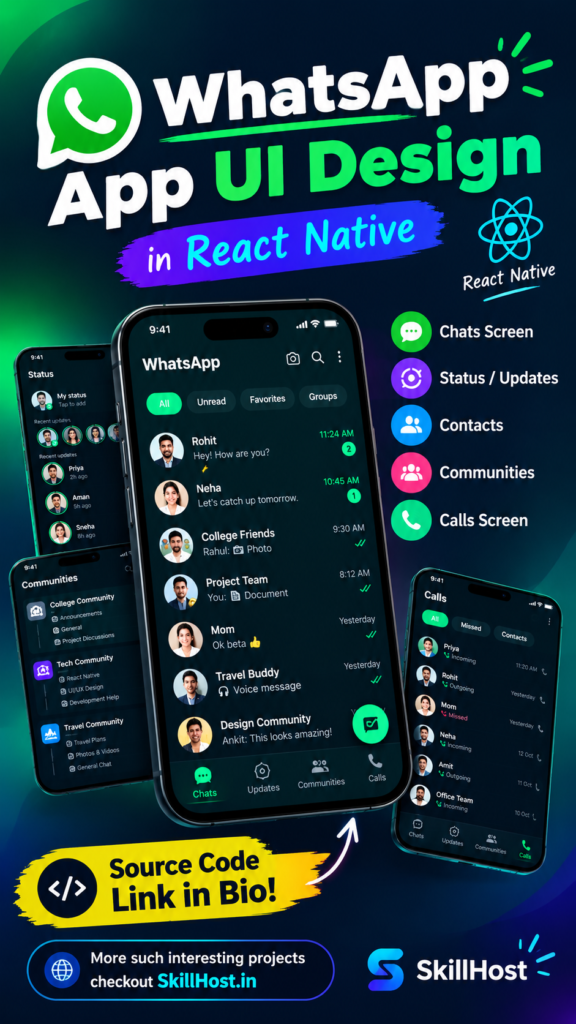
The project focuses entirely on the frontend experience and includes multiple screens such as Chats, Status Updates, Contacts, Communities, and Calls. It also includes dummy users, dummy conversations, status previews, call history, and interactive navigation so developers can explore the complete application flow without setting up a backend.
This project is useful for developers who want to create a messaging application prototype, practice React Native, build a portfolio project, or use an existing mobile UI as a foundation for their own application.
Important: This is a frontend UI project. It does not include WhatsApp’s backend, authentication system, database, real-time messaging infrastructure, or actual voice/video calling.
WhatsApp App UI Design in React Native – Project Overview
The goal of this project is to provide a clean and modern WhatsApp App UI design in React Native with a familiar messaging application experience.
The interface follows a simple mobile-first design with:
- WhatsApp-inspired green branding
- Clean white layouts
- Rounded search bars
- User avatars
- Chat previews
- Unread message counters
- Bottom navigation
- Floating action buttons
- Status indicators
- Call history
- Community sections
- Interactive chat screens
The project uses Expo, making it easier to run and test during development. Expo provides tooling and libraries designed to simplify React Native development for Android and iOS applications. Expo documentation
Features of the WhatsApp App UI
This WhatsApp App UI design in React Native contains the primary screens required for a modern messaging application.
1. WhatsApp Home / Chats Screen
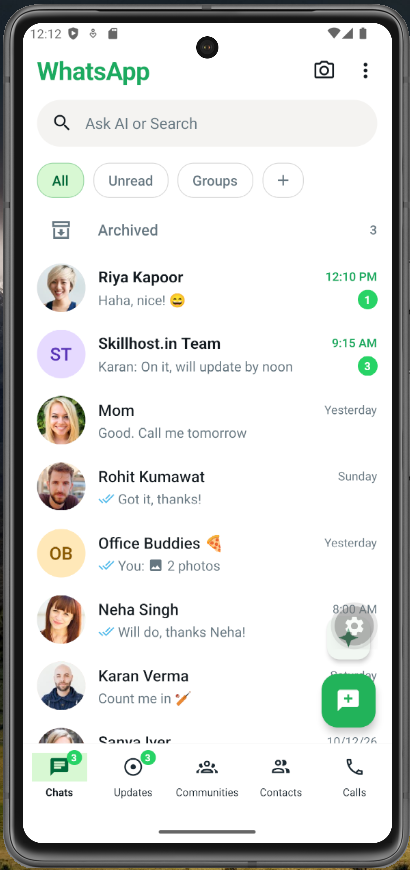
The home screen displays all available conversations.
The screen includes a list of dummy users with their latest messages and timestamps.
Chat screen features include:
- User profile avatar
- User name
- Latest message
- Message timestamp
- Unread message counter
- Search interface
- Chat filters
- Archived chats
- Floating new-chat button
- Message delivery indicators
For example, a chat can display:
Aarav Sharma
Hey! Are we still meeting today?
                         9:15 AM
Users can tap a conversation to open the individual chat screen.
This makes the project more than a static screenshot because the navigation between the chat list and individual conversations is implemented in the UI.
2. Individual Chat Screen
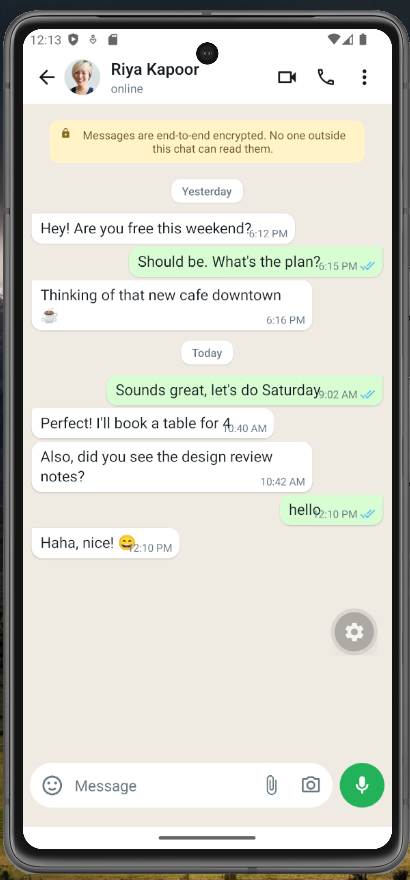
When the user selects a conversation, the application opens a dedicated chat interface.
The chat screen contains:
- Back navigation
- User avatar
- User name
- Online/last-seen status
- Voice call icon
- Video call icon
- More options button
- Encryption information
- Incoming messages
- Outgoing messages
- Message timestamps
- Read indicators
- Emoji button
- Attachment button
- Camera button
- Text input
- Send button
- Microphone UI
The project also includes dummy messages so the screen looks like a real conversation.
Users can type a message and send it within the local UI.
There is no backend involved in this functionality.
3. Status / Updates Screen
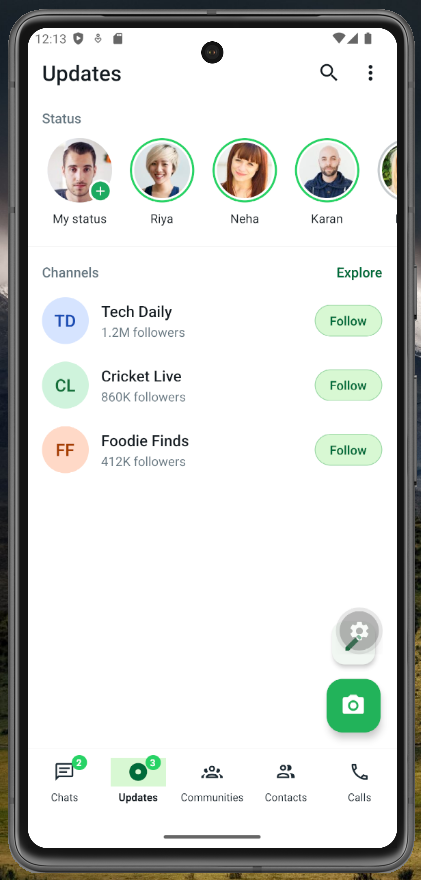
The Updates section provides a dedicated interface for status updates.
Users can see:
- My Status
- Recent status updates
- Profile avatars
- Status indicators
- Status timestamps
- Status viewer
- Reply interface
Tapping a status opens a separate status viewer screen.
The status viewer contains a progress indicator, user information, status content, and reply interface.
This provides a realistic navigation flow for developers experimenting with a React Native status UI.
4. Contacts Screen
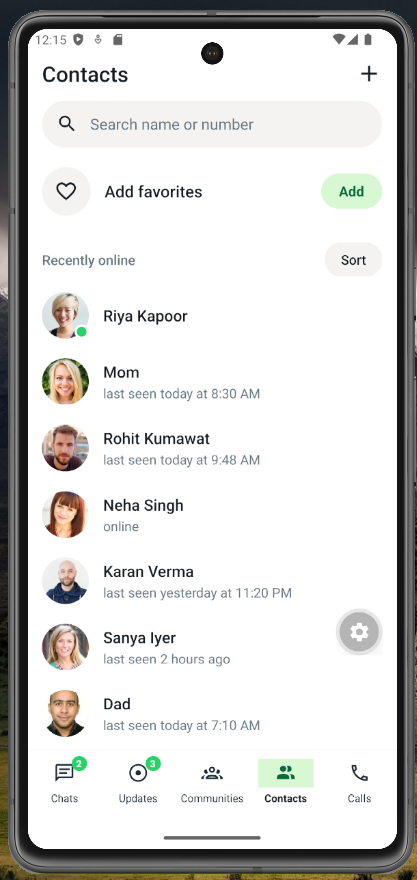
The Contacts screen provides a simple interface for discovering users.
It includes:
- Search by name or number
- Add favorites option
- Recently online users
- User avatars
- Online status
- Contact list
- Add button
The screen can later be connected to a real contacts API or your own backend.
For now, all users are represented using local dummy data.
5. Communities Screen
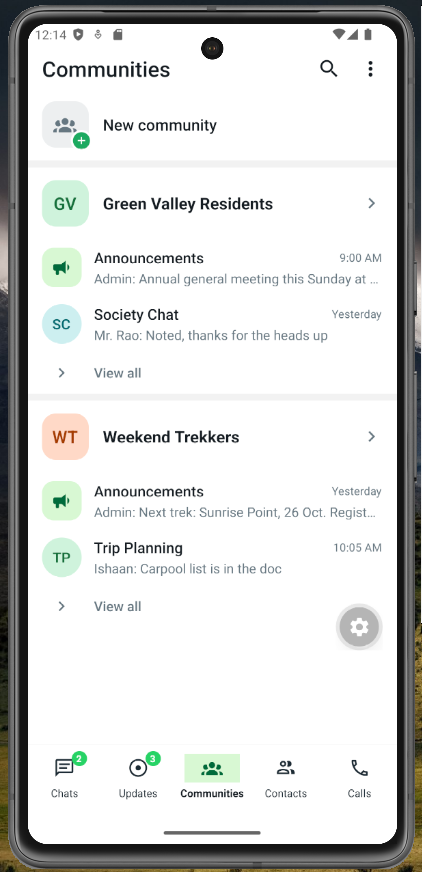
The project also includes a dedicated Communities screen.
The Communities UI contains:
- Community introduction
- Community icon
- Create community button
- Existing communities
- Community descriptions
- Community avatars
Example communities included in the demo are:
- Tech Community
- Friends & Family
- Work
This screen provides a starting point for developers who want to build group-based communication or community functionality into their own React Native application.
6. Calls Screen
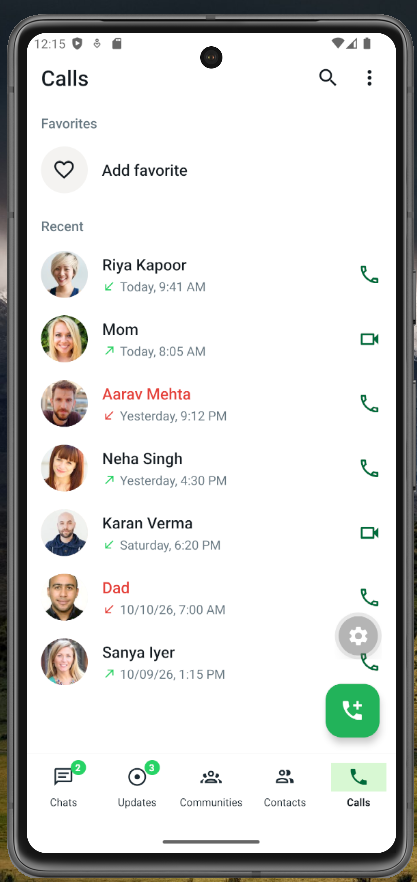
The Calls screen provides a clean call-history interface.
It displays:
- Recent calls
- Incoming calls
- Outgoing calls
- Voice call indicators
- Video call indicators
- Call timestamps
- Create call link interface
Example:
Aarav Sharma
↓ Today, 8:40 AM                         📹

Priya Mehta
↑ Yesterday, 7:15 PM                    📞
The current implementation is only a UI.
Actual voice and video calling would require a communication backend or third-party calling service.
Bottom Navigation
The application uses bottom navigation to make the primary sections easily accessible.
The navigation contains:
Chats
Updates
Communities
Calls
Contacts
This allows users to quickly switch between the major areas of the application.
The individual chat and status viewer screens are opened separately using stack navigation.
Technology Stack
The project is built using:
- React Native
- Expo
- JavaScript
- React Navigation
- Expo Vector Icons
- React Native core components
- Local dummy data
React Native provides native UI components such as View, Text, Image, and TextInput, which are used as the building blocks of mobile interfaces. React Native
React Native’s official documentation also covers fundamental concepts such as components, JSX, props, and state, which are important when extending this project. React Native
Why Use Expo for This React Native Project?
Expo is particularly useful when building and testing React Native applications because it provides development tooling around React Native.
The official Expo documentation describes Expo as a React Native framework that makes Android and iOS development easier and provides additional tooling and native modules. Expo documentation
For this project, Expo allows developers to quickly start the development server and test the application on a physical device or emulator.
How to Install the WhatsApp App UI
After downloading the project, open the project directory in your terminal.
Step 1: Install dependencies
npm installStep 2: Start the Expo development server
npx expo startExpo’s current documentation recommends npx expo start for starting the development server. Expo documentation
Step 3: Run the application
After starting Expo, you can:
- Scan the QR code using a compatible device
- Press
Ato open Android - Press
Ito open iOS - Run the project through an appropriate Expo development environment
Expo’s official tutorial also provides a complete workflow for creating and running React Native applications across Android, iOS, and web. Expo documentation
No Login or Backend Required
One of the main advantages of this project for UI development is that it does not require server-side authentication.
There is no:
- Login page
- Registration system
- Backend API
- Database
- User authentication
- Real-time messaging server
- Push notification backend
- Calling server
Instead, the project uses local dummy data.
This makes it suitable for developers who want to focus on the interface first.
You can later replace the dummy data with data from:
- Laravel API
- Node.js API
- PHP API
- Firebase
- Supabase
- MySQL
- PostgreSQL
- MongoDB
- WebSocket
- Socket.IO
How Developers Can Extend This Project
The current UI can act as the frontend foundation for a much larger messaging application.
For example, the chat screen could later be connected to a backend API.
Instead of:
const messages = [...]you could retrieve conversations from your own API.
Similarly, the local users could eventually be replaced with authenticated users from your database.
A production application could add:
- User authentication
- Profile management
- Real-time messaging
- Message delivery status
- Read receipts
- Image sharing
- Video sharing
- Voice messages
- File sharing
- Push notifications
- Group conversations
- Community management
- Voice calls
- Video calls
- Message reactions
- Message search
- Online presence
- Typing indicators
That is where the UI becomes the frontend layer of an actual messaging platform.
React Native WhatsApp UI for Learning and Practice
This project is also useful for developers learning React Native.
You can use it to practice:
- Components
- Props
- State
FlatListScrollViewTextInput- Touch interactions
- Navigation
- Bottom tabs
- Stack navigation
- Mobile layouts
- Flexbox
- Custom styling
- Reusable UI components
React Native’s official documentation explains that applications are composed using native components and React concepts such as components, props, and state. React Native
React Native WhatsApp UI Customization
The UI can be customized according to your application’s branding.
For example, developers can change:
Colors
const GREEN = '#25D366';
const DARK_GREEN = '#008F4C';
You can replace these colors with your application’s brand colors.
Users
The dummy users can be replaced with real users.
Messages
The dummy messages can be replaced with API responses.
Communities
The community list can be connected to your database.
Calls
The call-history UI can be connected to your actual calling system.
This makes the project a useful starting point rather than a closed application.
React Native and Expo Resources
If you are new to React Native, the official documentation is the best place to start.
React Native Documentation
Learn React Native components, concepts, APIs, and development fundamentals from the official documentation. React Native
Expo Documentation
Learn how to create, run, and develop Expo applications.
Expo Development Guide
Learn how to start an Expo development server and run your application on a device or emulator.
React Native + Expo Tutorial
Expo provides a practical tutorial covering application structure, navigation, layouts, platform differences, and other React Native development concepts. Expo documentation
React Native and Expo Tutorial
Explore More Developer Projects on SkillHost
If you are working on React Native applications, this WhatsApp-inspired project is only one possible starting point.
Explore more practical projects, templates, and developer resources on SkillHost.
Explore more projects on SkillHost
You can also explore other categories covering HTML, CSS, JavaScript, React.js, React Native, developer tools, UI components, templates, and practical development resources. SkillHost positions itself around practical developer resources and projects rather than purely theoretical tutorials. skillhost.in
For your SkillHost article, I recommend adding internal links to your React Native projects, website templates, developer tools, and other relevant projects that actually exist on the site. Don’t create fake category URLs just for SEO.
More Interesting Projects to Explore
If you liked this WhatsApp App UI design in React Native, check out other practical projects on SkillHost.
You can create a section like:
🔥 More React Native Projects
- Amazon App UI in React Native – Practice building an e-commerce mobile interface.
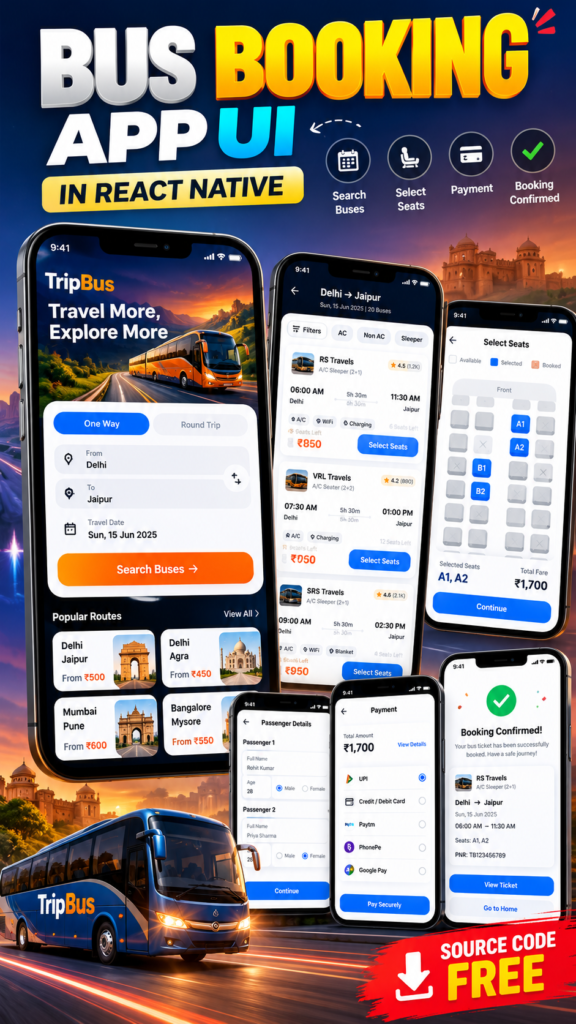
- Bus Booking App UI in React Native – Explore a travel and ticket-booking interface.
- UPI Payment App UI – Build a payment application interface.
- Other React Native UI Projects – Explore more mobile application concepts.
WhatsApp App UI Design in React Native – Project Benefits
This project provides several practical benefits for developers.
For beginners
It provides a practical example of how multiple React Native screens can work together.
For experienced developers
It provides a frontend foundation that can be connected to an existing backend or API.
For UI developers
It provides a reusable messaging interface that can be redesigned and branded.
For students
It can be used as a React Native practice project or portfolio project.
For freelancers
The interface can be customized as a starting point for client messaging, community, support, or social applications.
Frequently Asked Questions
Is this a real WhatsApp clone?
No.
This is a WhatsApp-inspired frontend UI project created for React Native development and prototyping. It does not reproduce WhatsApp’s backend infrastructure or services.
Does this project require login?
No. There is no login or registration system.
Does it have a backend?
No. The project uses local dummy data.
Can I add Firebase later?
Yes. The local users, chats, and other data can be replaced with Firebase or another backend.
Can I add a Laravel backend?
Yes. The React Native frontend can communicate with a Laravel API once authentication, endpoints, and data models are implemented.
Does the project support real-time chat?
Not currently.
The existing chat interaction is local UI functionality. Real-time messaging would require a backend communication layer such as WebSockets, Socket.IO, Firebase, or another suitable solution.
Does it support real voice and video calls?
No.
The Calls screen is a UI implementation. Actual calling functionality requires an appropriate calling infrastructure.
Is Expo required?
The supplied project is configured as an Expo project, so Expo is the intended development environment.
Conclusion
This WhatsApp App UI design in React Native provides a complete frontend foundation for developers who want to build a modern messaging application.
The project includes Chats, Status Updates, Contacts, Communities, Calls, and individual Chat screens, along with dummy users and conversations for demonstrating the application flow.
Because there is no backend or authentication system, developers can immediately focus on the UI and navigation before connecting the project to their own API, database, authentication system, real-time messaging service, notifications, or calling infrastructure.
If you’re learning React Native, building a portfolio project, creating a prototype, or starting a new messaging application, this project gives you a practical UI foundation that you can customize and extend.
Download the project, run it with Expo, customize the interface, and connect your own backend when you’re ready to turn the frontend into a complete application.