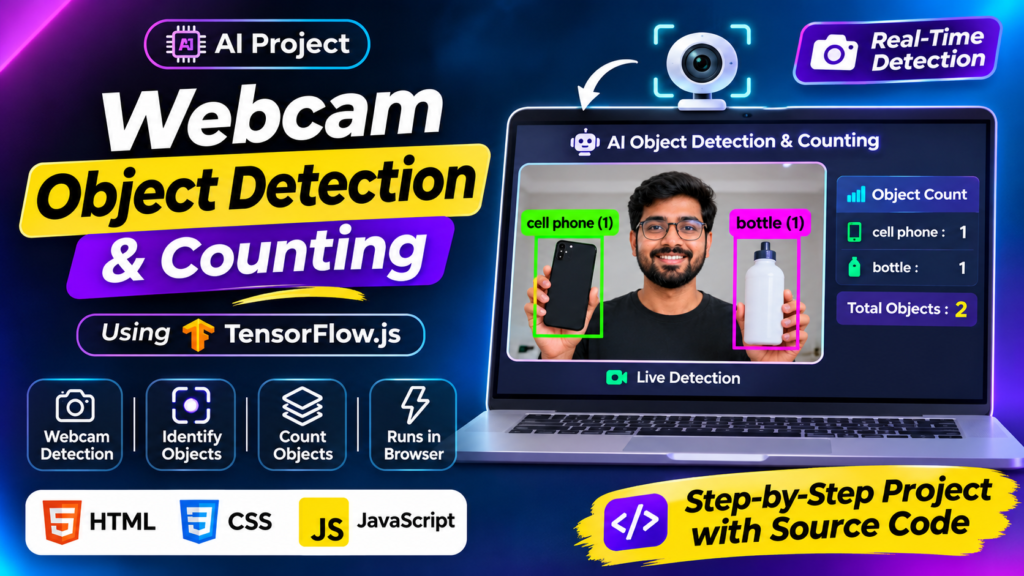
In this project, I developed a webcam object detection and counting using TensorFlow.js and HTML, CSS, Javascript. The application uses a webcam to identify objects in real time, display detection labels and bounding boxes, and automatically calculate the number of detected objects.
Instead of building a traditional AI application with a separate Python backend, this project demonstrates how browser-based machine learning can bring AI capabilities directly to a frontend application.
Whether you are learning JavaScript, exploring artificial intelligence, or looking for practical machine learning projects, this project is a useful example of combining frontend development with browser-based AI.
Artificial intelligence is no longer limited to Python applications or powerful cloud servers. With modern JavaScript libraries, developers can build intelligent web applications that perform machine learning tasks directly in a browser.
What Is the Webcam Object Detection and Counting Tool?
The Webcam Object Detection and Counting Tool is a browser-based AI application that identifies recognizable objects through a webcam.
When the camera starts, the application captures live video frames and processes them using TensorFlow.js. Detected objects are displayed with visual bounding boxes and their corresponding labels.
The application also maintains an object count, making it easier to understand how many objects are currently detected.
For example, when you place a mobile phone and a water bottle in front of your webcam, the application can identify both objects and display their individual labels and counts.
The main objective of this project is to demonstrate real-time object detection and automatic object counting using frontend technologies.
Key Features of This AI Object Detection Project
Here are the main features of the application:
1. Real-Time Webcam Object Detection
The application uses the device’s webcam to capture a live video stream. TensorFlow.js processes the camera input to identify recognizable objects without requiring users to upload images manually.
2. Automatic Object Recognition
The AI model identifies supported objects and displays their corresponding class labels. This makes it easier to understand what the camera is detecting.
3. Visual Bounding Boxes
Detected objects are highlighted using bounding boxes. These boxes help users identify the exact location of recognized objects within the camera frame.
4. Automatic Object Counting
One of the most useful features is automatic object counting.
The application displays the number of detected objects and can organize counts by object category.
For example:
- Mobile phones: 1
- Bottles: 2
- Chairs: 1
- Total detected objects: 4
The count represents the objects detected in the current detection results, rather than a guaranteed count of unique objects across time.
5. Browser-Based AI Processing
TensorFlow.js enables machine learning models to execute in JavaScript environments, including modern web browsers.
This project demonstrates how AI-powered functionality can be implemented without building a separate Python-based inference backend.
6. Simple and User-Friendly Interface
The application combines HTML and CSS to provide a straightforward interface for interacting with the webcam, viewing detection results, and checking object counts.
Technologies Used to Build This Project
This project combines frontend technologies with a JavaScript machine learning library.
| Technology | Purpose |
|---|---|
| HTML5 | Application structure and webcam interface |
| CSS3 | Styling and responsive user interface |
| JavaScript | Application logic and detection workflow |
| TensorFlow.js | Browser-based machine learning and object detection |
| Webcam API | Accessing the device camera |
Why TensorFlow.js?
TensorFlow.js is a JavaScript library that allows developers to build and execute machine learning models in browsers and Node.js environments.
It is particularly useful for frontend developers who want to experiment with AI without building an entirely separate Python-based application.
For this project, TensorFlow.js provides the machine learning functionality required to process camera input and identify objects.
You can learn more from the official TensorFlow.js documentation.
How Does Real-Time Object Detection Work?
The application follows a simple detection workflow.
Step 1: Access the Webcam
The application requests permission to access the user’s webcam. Once permission is granted, it receives the live camera stream.
Step 2: Load the AI Model
TensorFlow.js loads the configured object detection model so the application can begin processing visual input.
Step 3: Process Camera Frames
The application captures frames from the live video stream and passes them to the detection model.
Step 4: Identify Objects
The model analyzes the frames and returns detection results, including recognized object categories and their locations.
Step 5: Display Detection Results
JavaScript uses the detection results to display bounding boxes and object labels over the camera feed.
Step 6: Calculate Object Counts
The application processes the detection results and updates the object counter to show the number of detected objects.
This workflow allows users to see AI object detection and counting directly in their browser.
Why Build AI Applications Using JavaScript?
Traditionally, many machine learning applications are developed using Python frameworks and separate backend services.
However, TensorFlow.js gives frontend developers another option.
Some advantages include:
- Frontend integration: Integrate machine learning functionality into existing web applications.
- No separate Python inference server: Browser-based inference can eliminate the need for a dedicated Python backend.
- Interactive applications: Process webcam input and display detection results dynamically.
- Easy experimentation: Developers familiar with JavaScript can explore practical machine learning concepts.
- Flexible development: Combine HTML, CSS, JavaScript, and machine learning in one web application.
Actual performance depends on the model, browser, device hardware, and camera input.
Practical Use Cases of an Object Detection and Counting Tool
Browser-based object detection can be used as a starting point for several interesting applications.
Some possible use cases include:
1. Smart Inventory Demonstrations
Explore how computer vision can identify and count supported objects in front of a camera.
2. Educational AI Projects
Students can understand how machine learning models recognize objects and return visual detection results.
3. JavaScript Machine Learning Experiments
Frontend developers can experiment with computer vision without creating a traditional machine learning backend.
4. Smart Camera Prototypes
Use real-time object detection as a starting point for building more advanced camera-based applications.
5. Automated Object Recognition
Explore how object detection can be integrated into interactive web applications and other browser-based tools.
These are potential applications and extensions, not claims that every use case is already implemented in this project.
How to Run the Object Detection Project
You can run this project in a modern web browser.
Follow these general steps:
- Download the project source code.
- Extract the project files.
- Open the project using a local development server.
- Launch the application in a supported browser.
- Allow webcam access when the browser requests permission.
- Start the object detection process.
- Place recognizable objects in front of the camera.
- Observe the detection labels, bounding boxes, and object counts.
Important: Webcam access generally requires a secure context, such as HTTPS or localhost. Opening the project directly through a file:// URL may prevent camera access.
Frequently Asked Questions (FAQs)
1. Can JavaScript perform real-time object detection?
Yes. TensorFlow.js allows developers to run machine learning models in JavaScript environments, including modern web browsers. It can be used to identify objects from images, video elements, and webcam streams.
2. What is TensorFlow.js used for in this project?
TensorFlow.js provides the machine learning functionality used to analyze camera input and identify supported objects.
3. Can this application count multiple objects?
Yes. The application can display object counts based on its detection results, including counts grouped by recognized object category.
4. Does this project require Python?
No separate Python-based inference backend is required for this browser-based implementation. The application uses JavaScript and TensorFlow.js for its detection workflow.
5. Does the object detection tool require a webcam?
For the live detection functionality, a webcam or compatible camera is required. The browser must also be granted camera permission.
6. Is TensorFlow.js suitable for frontend developers?
Yes. TensorFlow.js makes it possible for JavaScript developers to experiment with machine learning and integrate AI-powered functionality into web applications.
7. Can I customize this AI object detection project?
Yes. Developers can extend the project by improving its interface, adding additional detection controls, implementing image uploads, or experimenting with other compatible machine learning models.
Conclusion
The Webcam Object Detection and Counting Tool demonstrates how artificial intelligence can be integrated into everyday web development using JavaScript.
By combining HTML, CSS, JavaScript, and TensorFlow.js, this project brings real-time object recognition and automatic object counting into a browser-based application.
It is a practical learning project for developers interested in frontend development, computer vision, and browser-based machine learning.
If you are exploring JavaScript AI projects, this is a useful starting point for understanding how machine learning can work beyond traditional backend applications.
Explore more practical developer projects, web development tools, and programming resources on SkillHost.
Discover more at SkillHost – Developer Projects and Tools.
More Interesting Projects to Explore
If you liked this YouTube Music App Clone Using React Native, check out other practical projects on SkillHost